Waterfall
Walk from a start to an end amount, step by step (P&L, net-worth change). What the waterfall is for, the data it needs and every option it has.
4 min read
On this page
Walk from a start to an end amount, step by step (P&L, net-worth change). It sits in the Financial group of the widget library.
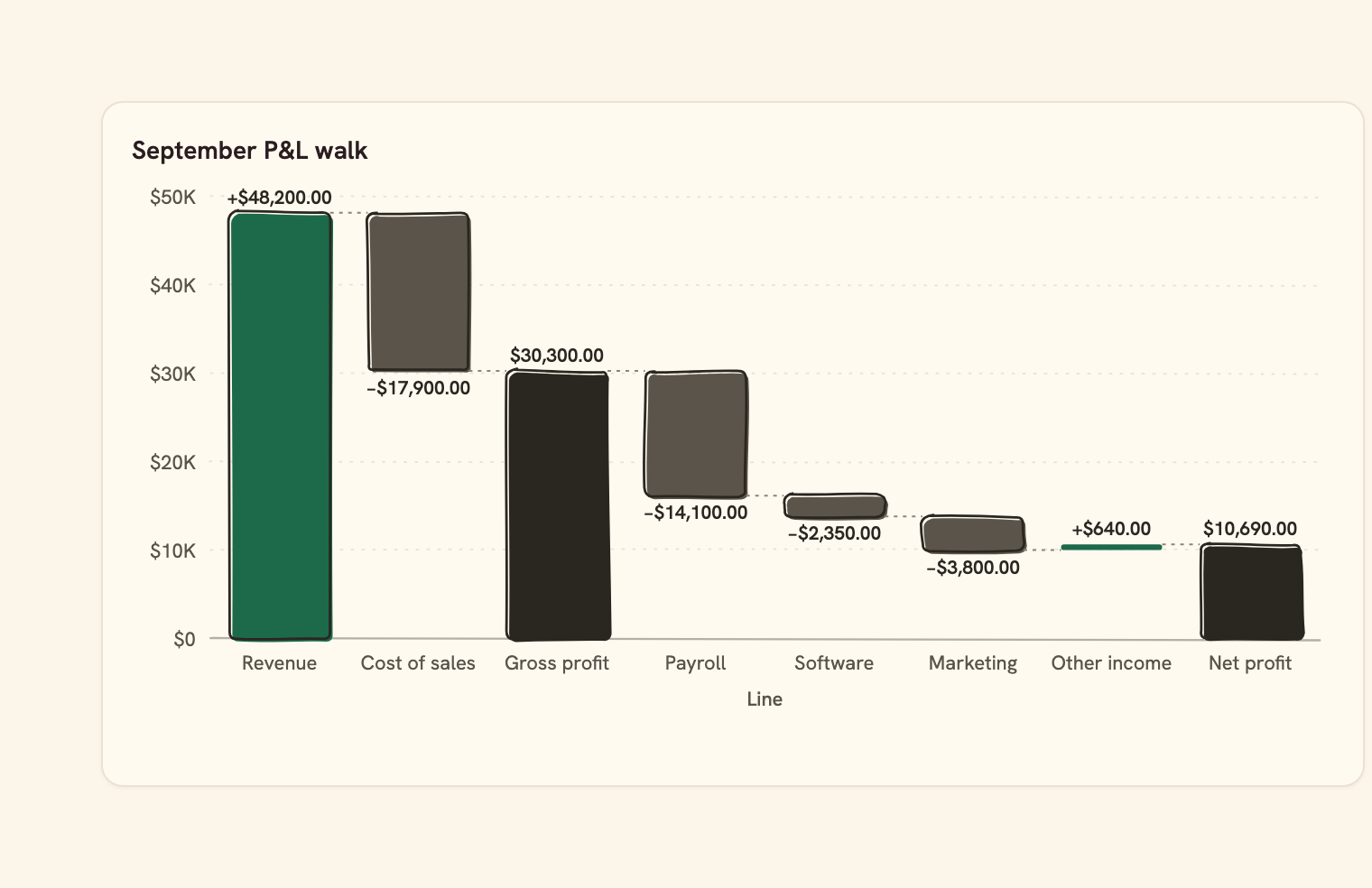
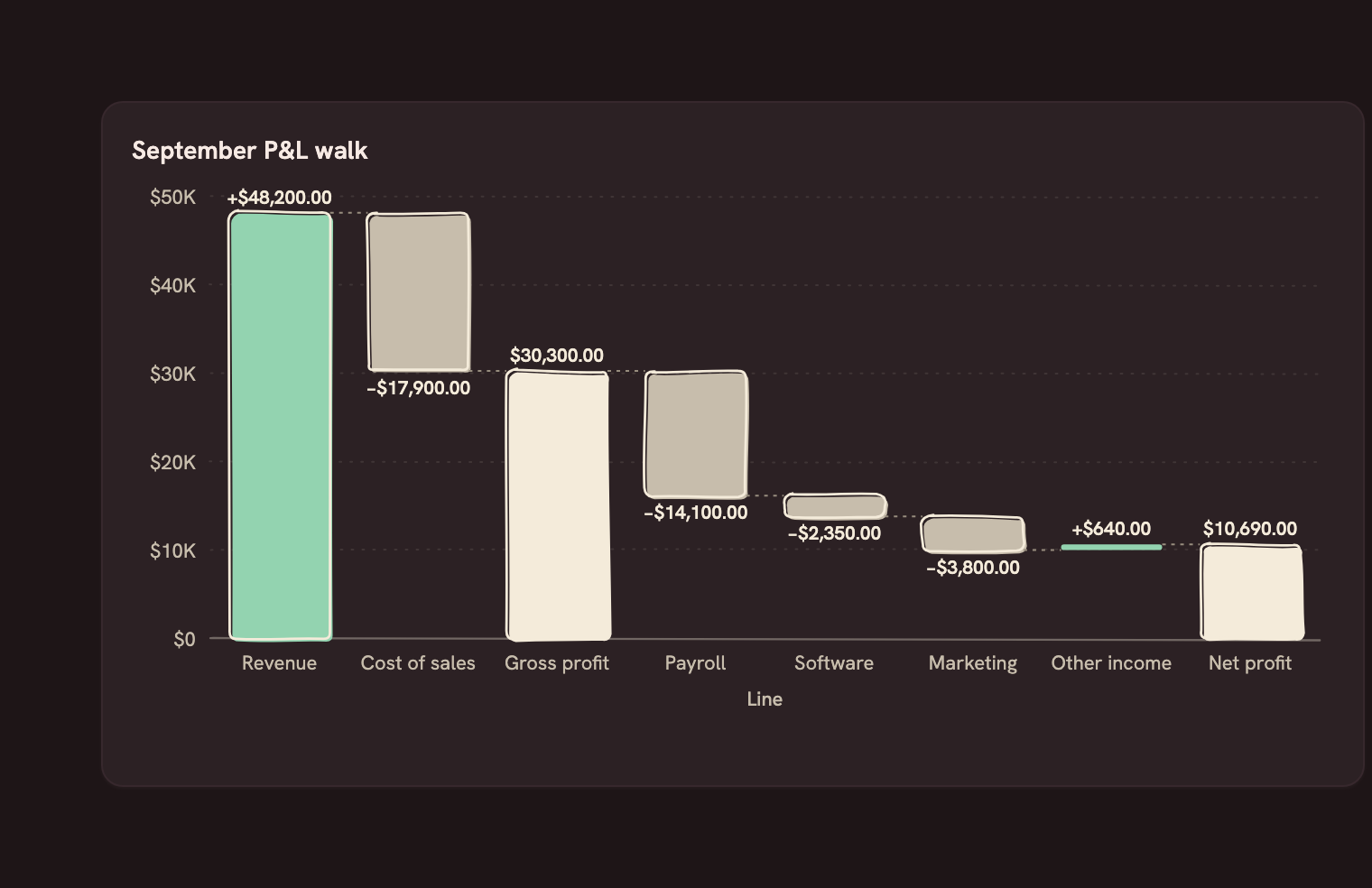
When to use it#
A Waterfall shows how a starting amount walks to an ending one, step by step. Each row is one step: a name and a signed change. Increases float up from the running total, decreases float down, and total bars stand on zero at the running total so far. It answers "what moved this number?": a P&L from revenue through costs to net profit, or what changed your net worth this month.
Rows draw in the order the query returns them. Name subtotal rows, such as "Gross profit", in Totals, or flag them with a Total field column; a total row's own value is ignored, because it shows the running total. Start bar adds a leading total seeded by the first row ("Opening balance"), and End bar adds a closing total after the last step ("Net profit").
Increases use the good status colour, decreases the bad one and totals the ink colour. A cost is not an error: a P&L can set the down colour to muted so costs read calmly. Colours accept palette slots and tokens, so they stay right in dark mode.
When to pick something else#
- Want the trend over time, not what made up one change? Use a Line chart or Column chart.
- Want each part's share of a total? Use a Donut or Treemap.
- Want money moving between many sources and destinations? Use a Sankey.
The data it needs#
Pick these in the Data tab of the inspector. BankSync suggests a column for each when your source has an obvious match.
| Field | Needed | Pick | Notes |
|---|---|---|---|
| Date | Yes | a date | Open/High/Low/Close are read from columns named o/h/l/c — shape them in the query. |
Each row is drawn as it is, so shape the rows first if you need totals. See Shaping data.
Waterfall options#
Set these on the Style tab of the inspector. "Automatic" means BankSync picks a value from the chart's size and data.
| Option | What it does | Values | New charts start with |
|---|---|---|---|
| Start bar | Name of a leading total bar, such as Opening balance. The first row then sets where the walk starts. | Text, up to 40 characters | Automatic |
| End bar | Name of a closing total bar after the last step, such as Net profit. | Text, up to 40 characters | Automatic |
| Connector lines | Thin lines joining the top of each bar to the next one. On by default. | On or off | Automatic |
| Orientation | Vertical columns, or horizontal bars that read top to bottom. | Vertical, Horizontal | Automatic |
| Corner radius | Rounds the corners of each bar, in pixels. | Number, 0 or more | Automatic |
Needs history#
Show a note instead of the chart until the rows cover enough periods, so a first week never reads as a trend.
| Option | What it does | Values | New charts start with |
|---|---|---|---|
| Date field | The date column whose distinct periods are counted. | Text | Automatic |
| Period | What counts as one period: a day, week, month, quarter or year. | Day, Week, Month, Quarter, Year | Automatic |
| Periods needed | How many distinct periods the rows must cover before the chart draws (2 to 60). | Whole number, 2 to 60 | Automatic |
| Waiting message | Shown until there is enough history. Leave empty for a message naming the periods. | Text, up to 120 characters | Automatic |
Shared chart styling#
Every chart also has the shared styling options. These apply to this one:
- Legend: position, layout and which series show.
- Axes: titles, tick labels and number format.
- Grid, title, padding and background.
- Value labels on the marks.
- Categories and labels: top N with "Other", sort order, readable labels, the handwritten callout.
- Style: corner radius, line width, opacity and animation.
- Tooltip on hover.
- Click to filter: clicking a mark can filter the rest of the dashboard. See Filters and cross-filtering.
- Colours: follow the dashboard palette or pick one for this chart.
Messy data#
- Rows with a missing or non-numeric value are skipped. With none left you see the empty state.
- A zero step draws as a flat line at the running total, so it still has a place in the walk.
- Rows are not re-sorted: order the query the way the walk should read.
- When the running total crosses zero, bars extend below the zero line.
On a phone#
Each step needs its own bar, so a phone card fits fewer steps comfortably. Keep a waterfall to about eight steps, or switch Orientation to horizontal so the names read top to bottom on a narrow card.
Related charts#
- Candlestick: OHLC price candles
- OHLC: Open-High-Low-Close bars
- Volume profile: Volume traded per price
Use this page with your AI assistant
Every BankSync doc is available as plain Markdown for agents and LLMs.