
Transfer Matching: Pair Internal Transfers
Turn on the Transfer Matcher so money moving between your own accounts is detected as a pair and tagged on both legs, instead of looking like unrelated income and spending.
4 min read
On this page
Money moved between your own accounts shows up twice: minus $500 in checking, plus $500 in savings. To a budget or P&L that reads as $500 of spending and $500 of income, both wrong. The Transfer Matcher detects these pairs while your data syncs and tags both legs, so downstream reports can recognize (or exclude) them.
There is exactly one Transfer Matcher per workspace — it is a single pairing layer across all the transaction feeds you attach it to, which is what lets it match a leg from one bank feed against a leg from another.

How pairing works#
Two records are paired when all of these hold:
- Opposite signs — one outgoing, one incoming.
- Exactly equal amounts — to the cent.
- Different accounts — a transfer has to leave one account and land in another. (Same-account pairs are matched separately, as reversals.)
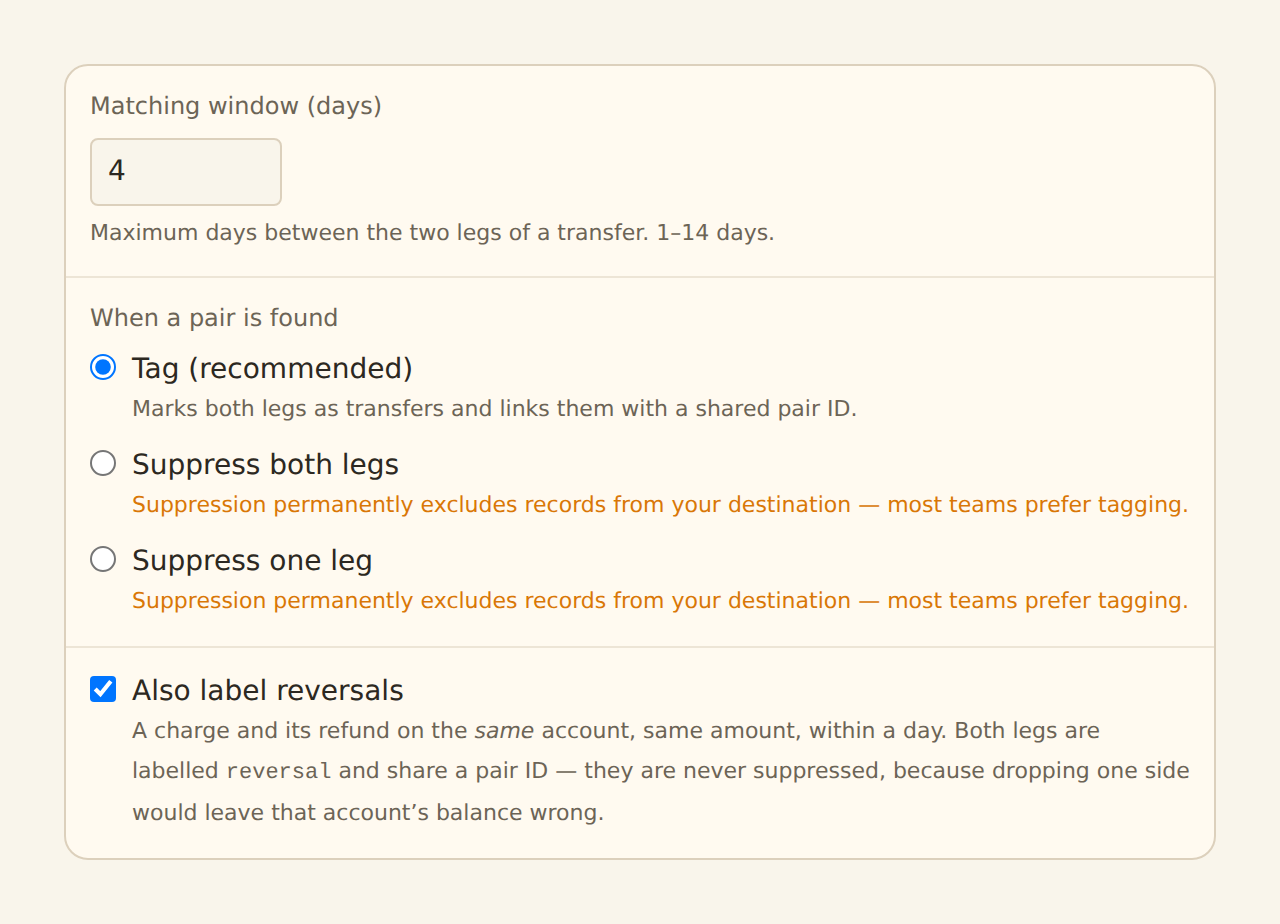
- Dates within the window — 4 days apart by default (banks post the two legs on different days more often than you would hope); configurable up to 14.
Matching happens in two passes. First, records syncing in the same batch are paired against each other, nearest dates first. Then any legs still unmatched are checked against candidates remembered from earlier syncs and other feeds — so a checking feed that syncs Monday and a savings feed that syncs Tuesday still pair up. Unmatched legs are remembered for the window plus a few days of grace, then expire.
When two or more legs could pair equally well (say two $500 moves on the same day), the matcher resolves ties deterministically, so re-syncing the same data always produces the same pairs.
What a match does#
By default the action is Tag (recommended):
- Both legs get their Type set to
transfer. - Both legs get the same id written into the Transfer Pair field, so you can line the two rows up in your destination.
Map the Transfer Pair column to see it
Reversals: the same shape on one account#
A charge and its refund sit on the same account — a reversal, not a transfer. The matcher pairs those too, and labels them differently:
- Both legs get their Type set to
reversal(nevertransfer), so a report or rule that looks for transfers is not thrown off by refunds. - Both legs still share a Transfer Pair id, so you can line them up the same way.
- Reversals are never suppressed, whatever action you picked. Both legs belong to one account and net to zero there; dropping one side would leave that account's own balance wrong.
- They use a tighter window — 1 day, or your matching window if you set it lower. Same-account matching gives up the "different accounts" guard, so it does not inherit a 14-day window: without it, an unrelated $50 purchase and $50 refund a fortnight apart would pair.
Turn this off with the Also label reversals checkbox if you would rather refunds stay untouched.
Suppression is opt-in#
Instead of tagging, you can choose to suppress both legs or suppress the outgoing leg only, keeping matched transfers out of the destination entirely.
Suppression removes rows from your synced data
Setting it up#
Create it
On the Enrichments tab, click "Add an enrichment" and choose Transfer Matcher in the Guard data group. If the option is disabled, your workspace already has one — open it instead.
Set the window
Keep the 4-day default unless your banks are slow to post; you can widen it to 14 days. Wider windows catch slower transfers but raise the odds of a coincidental match.
Pick the action
Keep Tag unless you have a specific reason to suppress (see the warning above).
Attach and enable
In the Dependencies tab, tick the transaction feeds it should watch — attach all the accounts you move money between, since pairing needs to see both sides. Then flip the switch to Enabled.
Expectations and edge cases#
Credit card payments
A card payment is a transfer to most people, but v1 matches exact amounts only — a partial payment (paying $400 against a $512 statement) will not pair. Exact-amount payments pair fine when both accounts are connected.
False-pair guards
The rules are deliberately strict — exact amounts, opposite signs, different accounts, dates in the window — because a wrong pair is worse than a missed one. Coincidences of the same amount in the window can still pair; the shared Transfer Pair id makes any such pair easy to spot and fix in your destination.
Records with no amount, a zero amount, or no account identity are skipped. Both accounts must be connected to BankSync — the matcher cannot pair against an account it never sees.
Related guides#
- Duplicate Screen: the other integrity guard — look-alike duplicates rather than transfer pairs.
- Filters: exclude records by condition, with the same suppression caveats.
- Configuring field mappings: map the Transfer Pair and Type columns.
Use this page with your AI assistant
Every BankSync doc is available as plain Markdown for agents and LLMs.