
Splits: Break One Record into Many
Create a Split enrichment that replaces a matching record with multiple lines, like payroll into wages, tax, and super, with amounts that always add up exactly.
3 min read
A Split enrichment replaces a matching record with several smaller ones whose amounts add up exactly to the original. The classic case is payroll: one $8,000 bank debit that your books need as wages, withheld tax, and superannuation on three separate lines, each with its own category. Other favorites: a fixed owner-draw carve-out, or a revenue share divided by percentage.
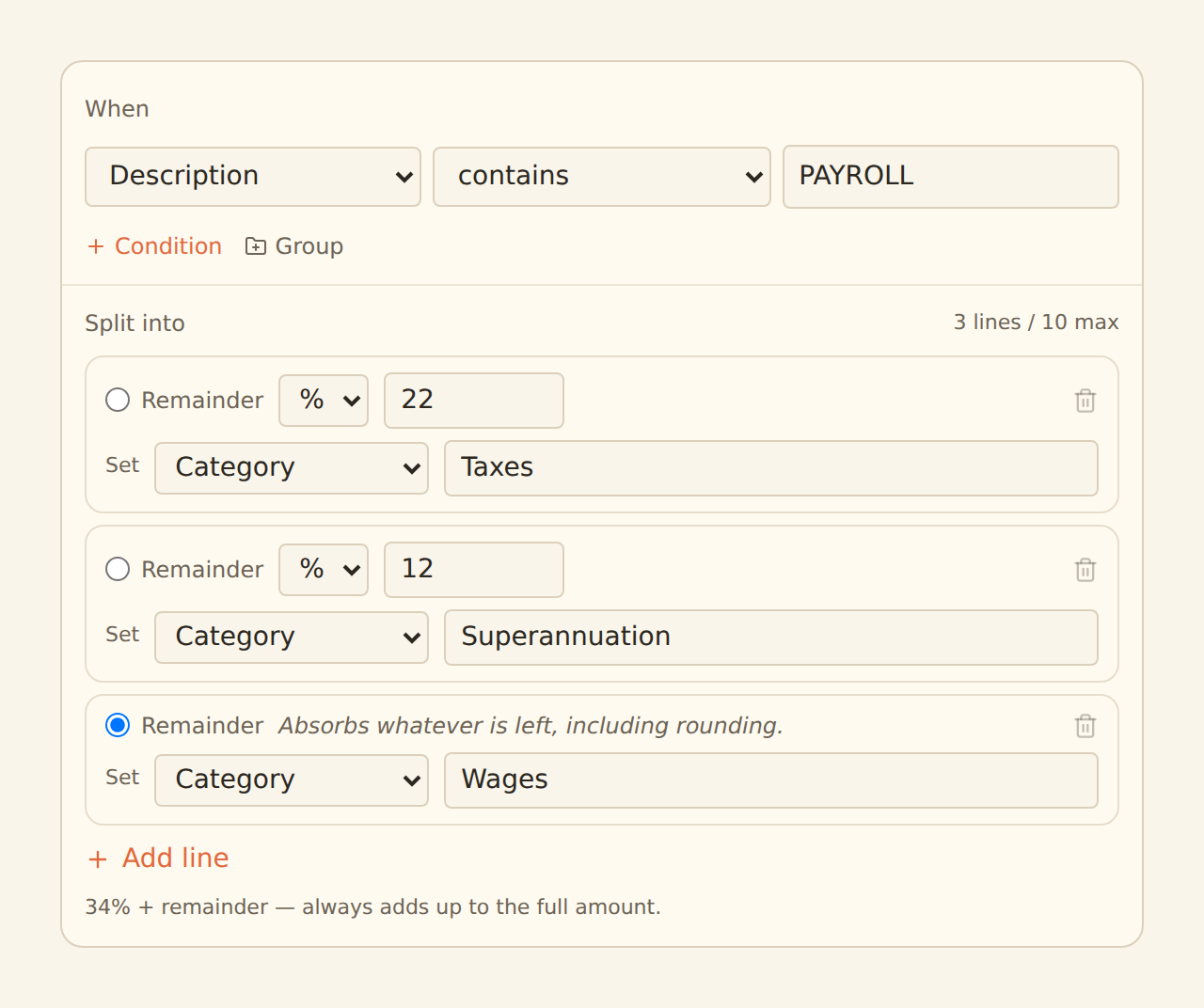
You define when to split with the same condition builder Rulesets use (for example, Description contains PAYROLL), and how to split with 2 to 10 lines.

Split lines#
Each line takes either a percentage of the parent amount or a fixed amount — and exactly one line must be the remainder, which absorbs whatever the other lines leave over (including rounding). Each line can also set values on the child it produces, most usefully Category.
A payroll example:
| Line | Allocation | Sets Category |
|---|---|---|
| Wages | remainder | Wages |
| PAYG tax | 22% | Taxes |
| Super | 12% | Superannuation |
The amounts always add up — exactly
Percentages across non-remainder lines may total at most 100%. The editor validates all of this at save: line count, one remainder, percent bounds, and that each Set field is enrichable for the data type.
What the children look like#
- Children inherit every field from the parent — date, description, account, everything — except the amount (recomputed per line) and whatever the line's Set fields override. Credit/debit columns, when present, are scaled proportionally so they stay consistent with the split amount.
- Children get derived ids based on the parent's id, so re-syncing the same data produces the same children instead of new rows.
- The parent record itself is replaced — it does not sync alongside its children.
Everything downstream sees the children, not the parent
A child produced by one split is never split again, even if it happens to match another Split enrichment — splitting is a single pass.
Setting it up#
Create the enrichment
On the Enrichments tab, click "Add an enrichment" and choose Split in the Guard data group.
Describe when to split
Build the condition that identifies the records, for example Description contains PAYROLL. Make it specific — every match becomes multiple rows.
Define the lines
Add 2 to 10 lines, give each a percent or a fixed amount, mark exactly one as the remainder, and set per-line field values such as Category.
Attach, preview, enable
Attach the feed in the Dependencies tab, check the feed's Live Preview (the parent shows struck through with its children beneath it), then flip the switch to Enabled.
Related guides#
- Creating Enrichments: the shared condition builder in full.
- Filters: the other guard that changes which rows sync.
- Alert enrichments: alerts evaluate the children a split produces.
Use this page with your AI assistant
Every BankSync doc is available as plain Markdown for agents and LLMs.