
Filters: Exclude Records from Syncing
Set up a Filter enrichment that keeps matching records out of your destination entirely, like pending orders, zero-dollar authorizations, or internal noise.
3 min read
On this page
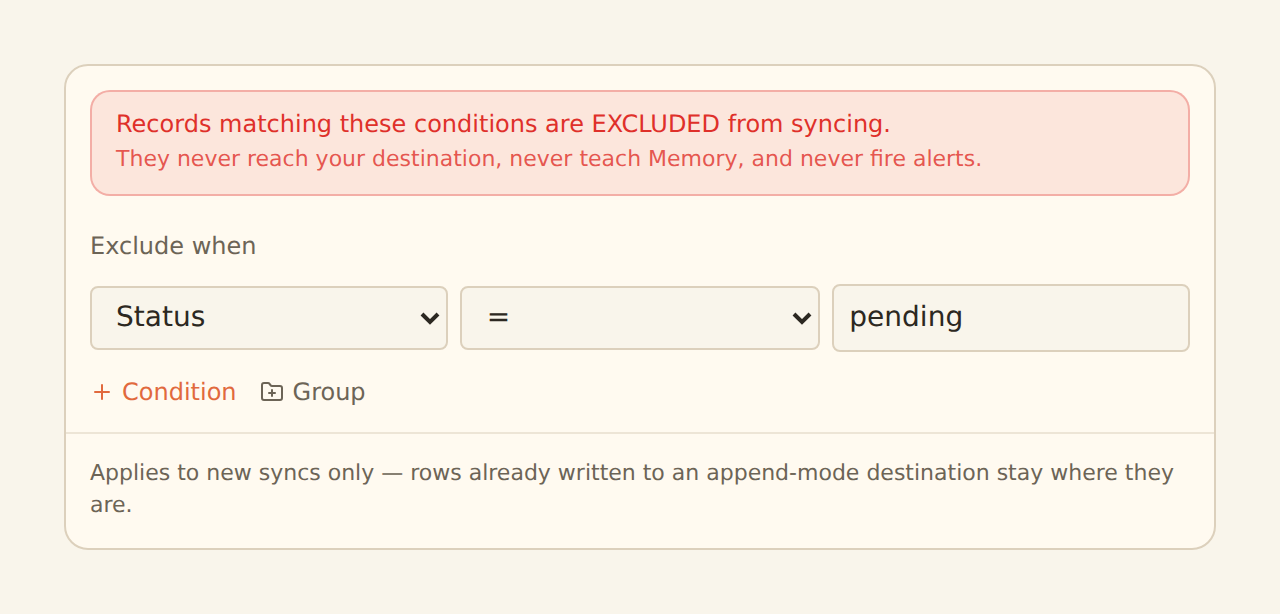
A Filter enrichment excludes matching records from the sync entirely. Records that match your conditions are suppressed: they never land in your connected sheet, database, or table. Typical uses: hide pending brokerage orders until they execute, drop $0 card authorizations, or keep internal test noise out of an analysis destination.
You describe what to exclude with the same condition builder Rulesets and Alerts use — field, operator, value, combined with AND/OR and nestable groups.

What suppression means#
Filters run first in the enrichment pipeline, before everything else. A suppressed record is gone for that sync, fully:
Never written
The record does not reach your destination. It is not hidden or greyed out there; it simply never arrives.
Never teaches Memory
Memory only learns from records that survive filtering, so excluded noise cannot pollute what BankSync learns about your categorization.
Never fires alerts
Alerts are evaluated after filters, so a suppressed record cannot trigger a notification.
Suppressed records are not deleted from your bank data. Loosen or disable the filter and future syncs include them again.
Append feeds: history stays
Creating a Filter#
Create the enrichment
On the Enrichments tab, click "Add an enrichment" and choose Filter in the Guard data group. (You can also create one from a feed's Mapping → Enrichments subtab, which attaches it to that feed automatically.)
Pick the data type
Choose which data type the filter applies to. The data type determines which fields you can use in conditions.
Describe what to exclude
Build the condition, reading it as "records matching this are excluded". For example: on an Orders feed, Status equals pending; on a Transactions feed, Amount equals 0. Conditions combine with AND/OR and can nest into groups.
Attach and enable
In the Dependencies tab, tick the feeds this filter should guard, then flip the switch from Disabled to Enabled.
Preview before you trust it#
The Filter form has an Impact line: click "Estimate what this excludes" and BankSync samples recent records from the feed this filter is attached to, then shows how many of them the condition would exclude. The number updates as you edit the condition — the sample is taken once and re-checked locally, so you can tune the condition and watch the count move.
The feed's Live Preview shows the same thing on real rows: excluded rows appear struck through rather than silently dropping, and the Enrichments tab shows a per-filter count of how many records each filter excluded. Check both before enabling — a condition that is too loose looks exactly like a working filter until you notice the count.
Excluding most of a batch asks for confirmation
Examples worth copying#
Hide pending
Status equals pending: only non-pending orders reach your destination.
Drop $0 auths
Amount equals 0: card authorization holds never clutter the sheet.
Mute a vendor
Description contains an internal transfer descriptor or test merchant you never want downstream.
Related guides#
- Creating Enrichments: the shared condition builder in full.
- Transfer Matching: pair internal transfers instead of filtering them blind.
- Alert enrichments: alerts only see records that survive your filters.
Use this page with your AI assistant
Every BankSync doc is available as plain Markdown for agents and LLMs.