
AI Categorizer and Merchant Cleanup
Let AI fill the categories that Memory and your rules leave empty, and clean raw bank descriptors into canonical merchant names, with confidence gating and a review queue.
5 min read
On this page
The AI Categorizer fills in the categories nothing else could. It runs last in the fill order, after Memory, lookups, and your rules — and only touches fields that are still empty by then. Your explicit rules and everything BankSync has learned from you always outrank the model; AI handles the long tail of merchants nobody has categorized yet.
Merchant Cleanup is its sibling: the same machinery pointed at the Merchant Name field, turning raw descriptors like SQ *BLUE BTL COF 0442 OAK into clean canonical names like Blue Bottle Coffee. Both live in the AI & learning group of the enrichment picker.

Where the categories come from#
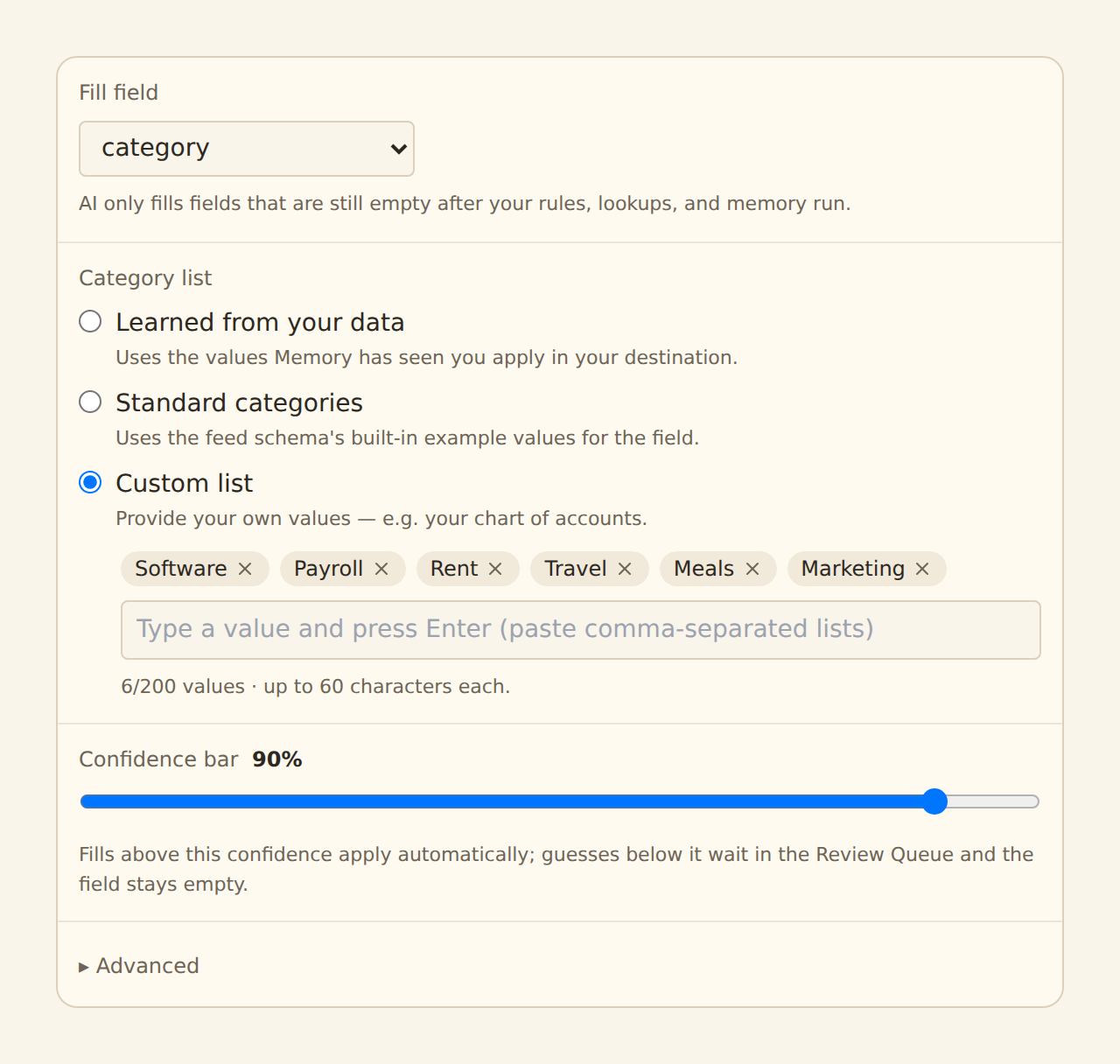
The categorizer classifies each merchant into a taxonomy — the set of allowed values. You choose the source:
Your custom list
Type your own category list (up to 200 values). Best when your books have a fixed chart of categories the AI must stay inside.
Learned from you
Use the distinct values BankSync has learned from your corrections via Memory. Your real vocabulary, kept current automatically.
Schema defaults
A sensible built-in category set. Zero setup; fine for getting started.
Cold start on a new workspace
The result is always allow-listed against the taxonomy: the model cannot invent a category outside your list.
Confidence: fill or queue, never guess quietly#
Every AI suggestion carries a confidence score, checked against your confidence threshold (default 0.8):
- At or above the threshold — the value is written into the still-empty field, like any other enrichment fill.
- Below the threshold — the field is left empty and the suggestion goes to the Review Queue, where you accept, edit, or reject it. One decision covers every record with the same merchant pattern, and accepting teaches Memory so future records fill automatically.
Raise the threshold for a stricter book (more suggestions queued for your eyes), lower it to automate more aggressively.
Caching: repeated merchants are free#
AI results are cached per merchant pattern. The first time an unrecognized merchant appears, the model classifies it; every later record from that merchant — this sync or any future one — reuses the cached answer at no AI cost. In practice your spend tracks new merchants, not transaction volume: a thousand Uber rides cost one classification.
Each sync also has a cap on new (uncached) patterns sent to the model (default 500), so an enormous first backfill cannot run away with model usage in one go — the overflow is simply picked up by subsequent syncs. A second ceiling applies across all of your AI enrichments together, so adding more of them cannot multiply what one sync sends. Changing the taxonomy resets the cache (the old answers were for a different category list).
What AI enrichment costs you
Fail-open: a model outage never blocks your sync
The correction loop#
AI fills are the start of the conversation, not the end. When you correct an AI-filled value in your connected sheet, database, or table, Memory learns the correction — and because Memory runs before AI and fills first, your corrected value wins for every future record from that merchant. The AI never fights you on a merchant you have corrected; it moves on to merchants you have not.
Privacy: what the model sees#
Only normalized merchant patterns are sent to the model — the descriptor with numbers, store codes, and reference noise stripped (for example, starbucks). Never account names or numbers, never amounts, never dates, never your raw statement lines. The cached results are stored per workspace and never shared across workspaces.
Merchant Cleanup#
Merchant Cleanup uses the same cache-first, confidence-gated, fail-open machinery to fill the Merchant Name field where your bank left it blank, with a fixed contract: return the canonical merchant name — title-cased, no store numbers, no city suffixes — or nothing. It never invents a brand: if the model cannot identify the merchant from the descriptor, the field stays empty.
Setup is near-zero: create it from the AI & learning group, attach feeds, enable. Map the Merchant Name column in your field mappings to see the cleaned names in your destination. As with categories, correcting a name in your destination teaches Memory and permanently outranks the AI for that merchant. Merchant Cleanup has its own guide covering the output contract and setup in full.
Setting up the AI Categorizer#
Create it
On the Enrichments tab, click "Add an enrichment" and choose AI Categorizer in the AI and learning group of the type picker.
Choose the taxonomy
Pick custom, learned, or default — and enter your category list if custom.
Set the confidence threshold
Keep 0.8 to start. You can tune it later once you have seen a few syncs worth of fills and queued suggestions.
Attach and enable
In the Dependencies tab, tick the feeds, then flip the switch to Enabled.
Work the Review Queue occasionally
Below-threshold suggestions accumulate there. Each accept or reject teaches Memory, so the queue shrinks as BankSync converges on your vocabulary.
Related guides#
- Merchant Cleanup: the sibling enrichment for canonical merchant names.
- Review Queue: where below-threshold suggestions wait, and what accept/reject do.
- Memory: auto-learn: the learning layer that outranks AI and absorbs your corrections.
- Creating Enrichments: rules, the explicit layer that runs before AI.
- Lookup Tables: deterministic vendor mappings, when you already know the answer.
Use this page with your AI assistant
Every BankSync doc is available as plain Markdown for agents and LLMs.