
Budgets: Alert When Totals Cross a Threshold
Create a Budget enrichment that alerts you when spending, income, transaction count, or a balance crosses a threshold for a month, quarter, or rolling window.
4 min read
On this page
A Budget watches totals rather than single records: it alerts you when spending, income, net flow, transaction count, or a balance crosses a threshold over a period. Where an Alert fires on "a transaction over 1,000", a Budget fires on "marketing spend this month over 10,000" — the aggregate condition an Alert cannot express. Like every Watch enrichment, it never changes your data.
You can create as many Budgets as you need — one per category, client, or account you care about.

How a budget is expressed#
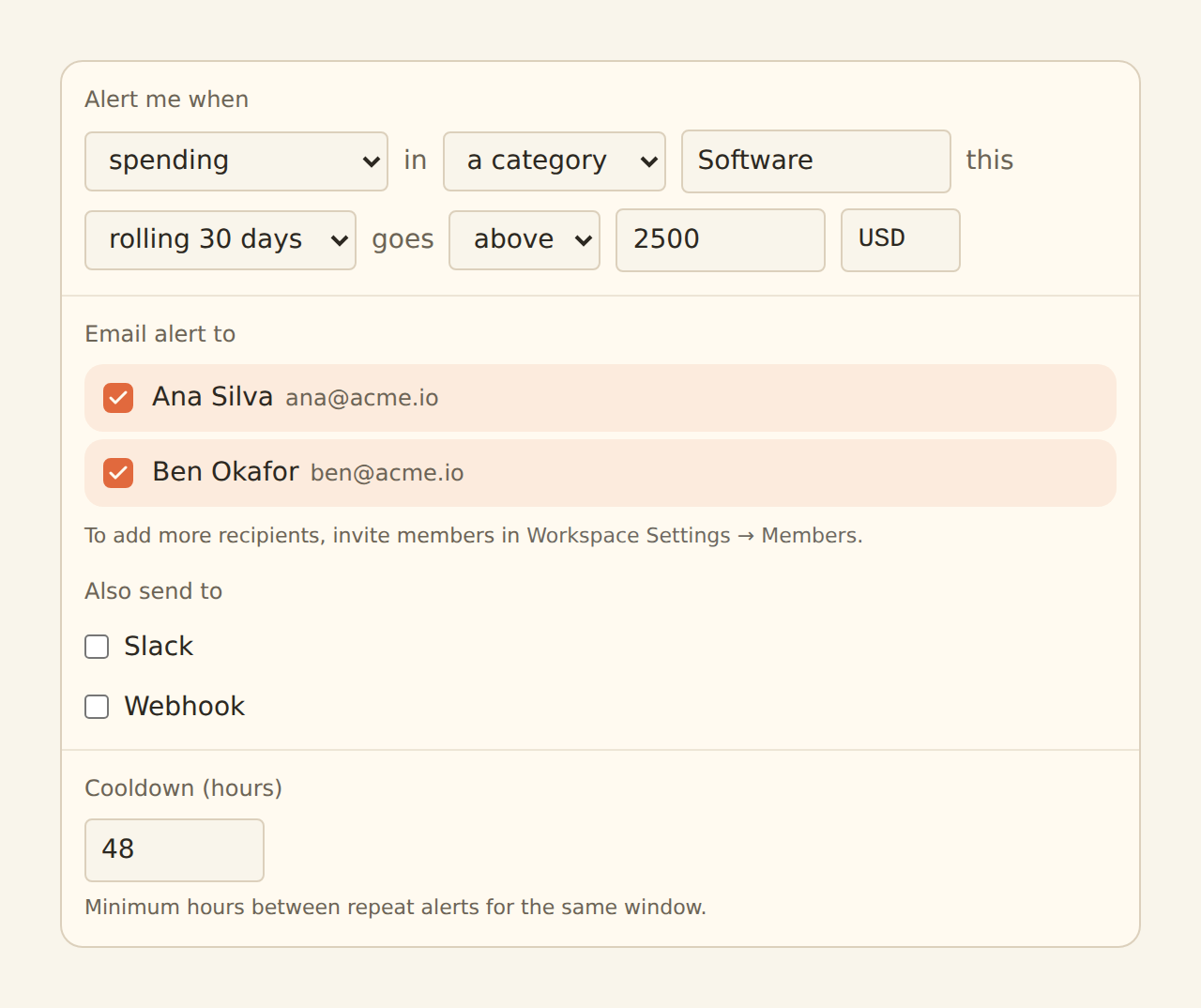
The form reads as a sentence: "Alert me when [metric] in [scope] this [window] goes [above/below] [threshold]."
Metric
Spending (outflows), income (inflows), net, transaction count, or latest balance. Spending and income are kept separate, so refunds landing mid-month don't quietly hide real spend.
Scope
Everything the budget's feeds sync (total), one category, one merchant, or — for latest balance only — one account. Merchant scoping uses the same descriptor normalization as Memory, so "Uber" covers every UBER *TRIP variant.
Window
Month to date, quarter to date, or a rolling 7-day or 30-day window. Windows are tracked in UTC.
Direction and threshold
Above or below a threshold in a single currency you choose. Records in any other currency do not count toward the total.
Some combinations do not make sense, and the editor rejects them at save:
- Latest balance can only target an account or the total (it reads balance snapshots, not flow sums), and account scope only supports the latest-balance metric.
- Below with a rolling window is rejected: a rolling window never "ends", so a below-threshold condition would never be decidable. Below-threshold budgets need a month or quarter window (they fire on the window's final day) or the latest-balance metric (which is decidable at any moment).
Where the totals come from#
Budget totals are accumulated from the records your feeds actually sync, after all your other enrichments have run — so a category budget counts the categories your rules, lookups, Memory, and AI actually wrote, and records suppressed by a Filter never count.
A Budget itself has no data type: it watches workspace totals, so every feed you attach contributes what it can — transaction feeds build the day-by-day flow totals (spending, income, net, count), and balance feeds keep the per-account snapshots the latest-balance metric reads. A latest-balance budget therefore needs a balances feed attached and syncing; the flow metrics need a transactions feed. Nothing else has to be configured for the two to work together.
Records count toward the dates they occurred, not the day they synced. That has a very useful consequence: a backfill fills in past months (up to 13 months back), so a month-to-date or quarter-to-date budget is meaningful almost immediately after a deep backfill.
Totals start accumulating when you enable a watch enrichment
When it fires#
BankSync evaluates every enabled Budget on a schedule of its own, independent of your syncs — so a breach fires even on a day no sync runs (a rolling window can cross a threshold simply because old days fell out of it). When the threshold is crossed, the alert goes to your configured destinations — the same email, Slack, and webhook channels Alert enrichments use — naming the metric, window, threshold, and the current value.
A breach that persists does not page you every evaluation: the cooldown (default 24 hours, configurable 1–168) is the minimum time between repeat alerts for the same budget condition.
Latest balance is a cached snapshot
Creating a Budget#
Create the enrichment
On the Enrichments tab, click "Add an enrichment" and choose Budget in the Watch group.
Build the sentence
Pick the metric, scope (and the category, merchant, or account value if not total), window, direction, threshold, and currency. The default is total spending, month to date, above 1,000 USD.
Choose destinations
Email recipients (workspace members), a Slack incoming-webhook URL, or a webhook endpoint — the same destinations block as Alerts.
Set the cooldown
Keep the 24-hour default unless you want faster repeats for a persisting breach.
Attach and enable
In the Dependencies tab, tick the feeds whose records should count toward the total, then flip the switch to Enabled.
One budget per question
Related guides#
- Alert enrichments: per-record conditions, using the same delivery channels.
- Digests: a scheduled summary built from the same running totals.
- Fee Ledger: the fee-specific watcher, with its own creep alert.
- Creating Enrichments: the shared enrichment workflow (Dependencies tab, enable switch).
Use this page with your AI assistant
Every BankSync doc is available as plain Markdown for agents and LLMs.