
Recurring Registry: Track Subscriptions and Bills
Turn on the Recurring Registry to detect subscriptions and recurring bills from your transactions, and get alerted on price increases and missed charges.
3 min read
The Recurring Registry learns which merchants charge you on a regular cadence — subscriptions, utilities, rent, SaaS — and watches each series for the two things worth interrupting you about: a price increase and a missed charge. It builds its picture entirely from the transactions your feeds sync; there is nothing to list by hand.
There is exactly one Recurring Registry per workspace. Target it at feeds via its Dependencies tab like any enrichment.

How detection works#
Every outgoing charge is grouped by its normalized merchant descriptor (the same normalization Memory uses, so NETFLIX.COM 866-579-7172 and NETFLIX.COM are one series). For each merchant, BankSync tracks the typical amount, the recent charge history, and the average gap between charges — the cadence.
Three rules keep the statistics honest:
- Only charges count. Refunds and incoming credits are ignored, so a refund never resets a subscription's price history.
- Same-day repeats are not a cadence. Two charges on one day update the amount stats but do not teach a "0-day cadence".
- Cold start: nothing fires until a merchant has 5 observed charges. A merchant you have paid twice is not yet a subscription.
Renamed descriptors start a new series
The watch rules#
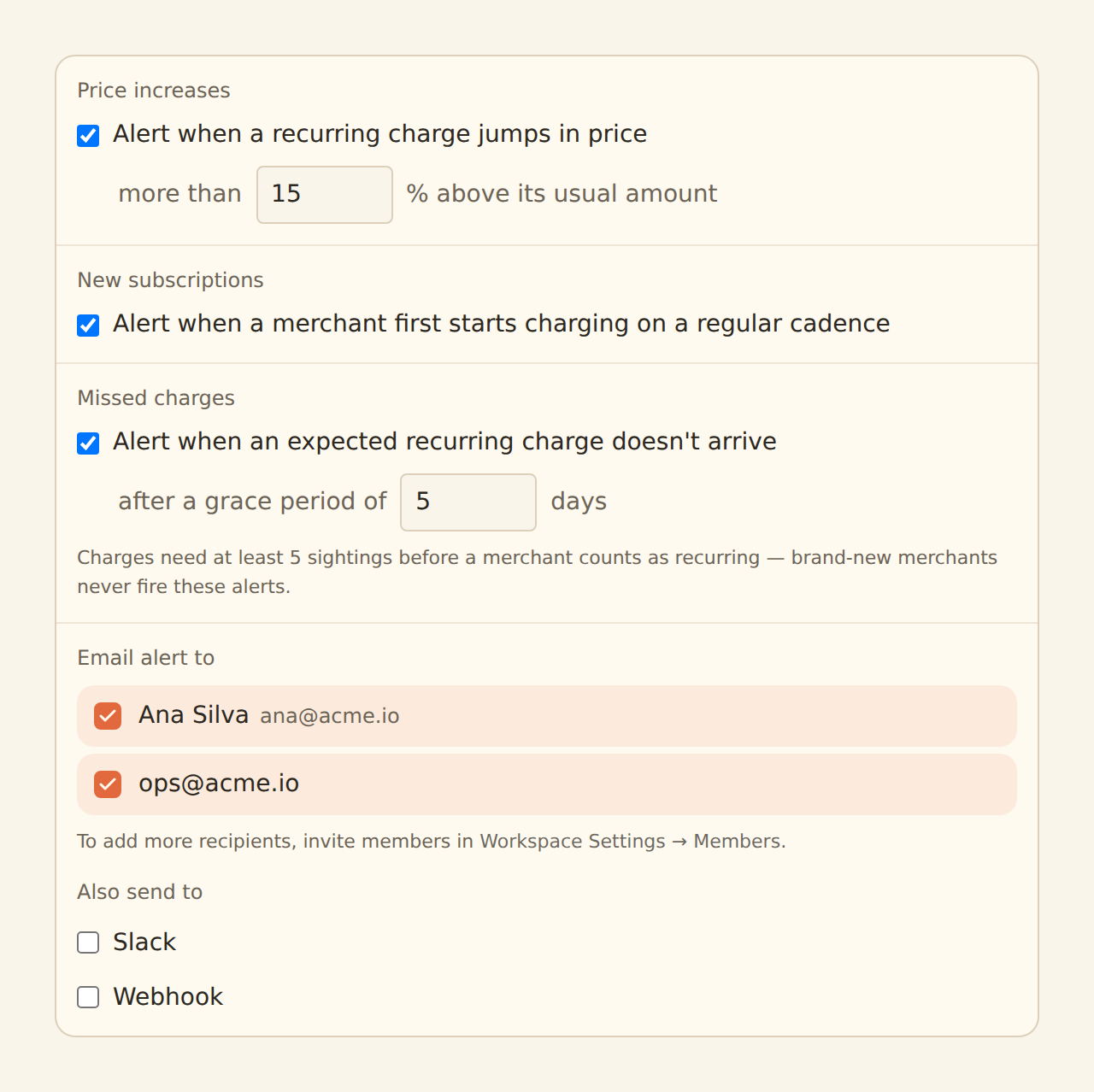
Price increase
The latest charge jumped versus the series' recent median. Default threshold 10% (0 turns it off, up to 500%). Fires at most once per merchant per sync.
New subscriptions
A toggle to be told when a merchant first starts charging on a regular cadence. Off by default.
Missed charge
An expected charge did not arrive. You set the grace period (1–60 days past the expected date); 0 — the default — leaves the check off.
Price increase is built for real-world bills, not just fixed-price subscriptions. The latest charge is compared to the median of the previous charges, and the alert only fires when the jump beats both your percentage threshold and the series' own normal variation — so a utility bill that swings with the seasons does not cry wolf, while a genuine plan-price hike does. A charge that goes from free to paid gets its own alert copy ("trial ended?"). The check needs a real series behind it: at least five charges, an established cadence, and four recorded amounts for the median.
Missed charge projects the next expected date from the last charge plus the series' average gap, and fires once expected date + grace period has passed with no charge. It is evaluated by BankSync on a schedule, not during syncs — absence is exactly the thing a sync cannot observe. Annual charges need three observed gaps before this check trusts the cadence, which means a yearly renewal cannot fire a missed-charge alert in its first year — by design, since one year-gap is not yet a pattern.
Pair it with the Feed Monitor
Setting it up#
Create it
On the Enrichments tab, click "Add an enrichment" and choose Recurring Registry in the Watch group. If the option is disabled, your workspace already has one — open it instead.
Choose the watch rules
Toggle price increase (and tune the percentage), new subscriptions, and missed charge (and set the grace days). Zero-valued thresholds mean off.
Choose where alerts go
Email recipients, a Slack incoming webhook, or a webhook endpoint — the same delivery channels every Watch enrichment uses. Repeat alerts for the same finding are held back by a 24-hour cooldown.
Target the feeds
In the Dependencies tab, tick the transaction feeds to learn from, then flip the switch to Enabled.
Detection begins with the next sync. Expect the first alerts only after your regular charges have each been seen five times — on monthly bills, a deep backfill gets you there immediately, since historical charges build the series just as well as new ones.
Related guides#
- Anomaly Detector: reads the same merchant history to spot unusual one-off activity; known-recurring merchants are exempt from its spike check.
- Feed Monitor: rules out a stalled feed when a missed-charge alert lands.
- Budgets: threshold alerts on totals rather than per-merchant series.
- Alert enrichments: the shared delivery channels (email, Slack, webhook).
Use this page with your AI assistant
Every BankSync doc is available as plain Markdown for agents and LLMs.