
Anomaly Detector: Flag Unusual Activity
Turn on the Anomaly Detector to get alerted about large first-time merchants, amount spikes against a merchant’s history, and bursts of transactions on one account.
3 min read
The Anomaly Detector flags activity that does not fit your history: a large charge from a merchant you have never paid, an amount far outside a merchant's normal range, or a burst of transactions on one account. It is built to be conservative — every design choice trades a missed edge case for fewer false alarms, because an anomaly detector you have muted is worth nothing.
You can create multiple Anomaly Detectors — each instance targets its own feeds and alerts independently, so tighter thresholds on sensitive accounts can run alongside a broader default. It evaluates during your syncs, over the records each sync brings in — so its freshness matches your feed cadence, and like every Watch enrichment it never changes your data.

The checks#
Each check is independently toggleable with its own threshold; zero or unset means off. At least one must be on.
New merchant over amount
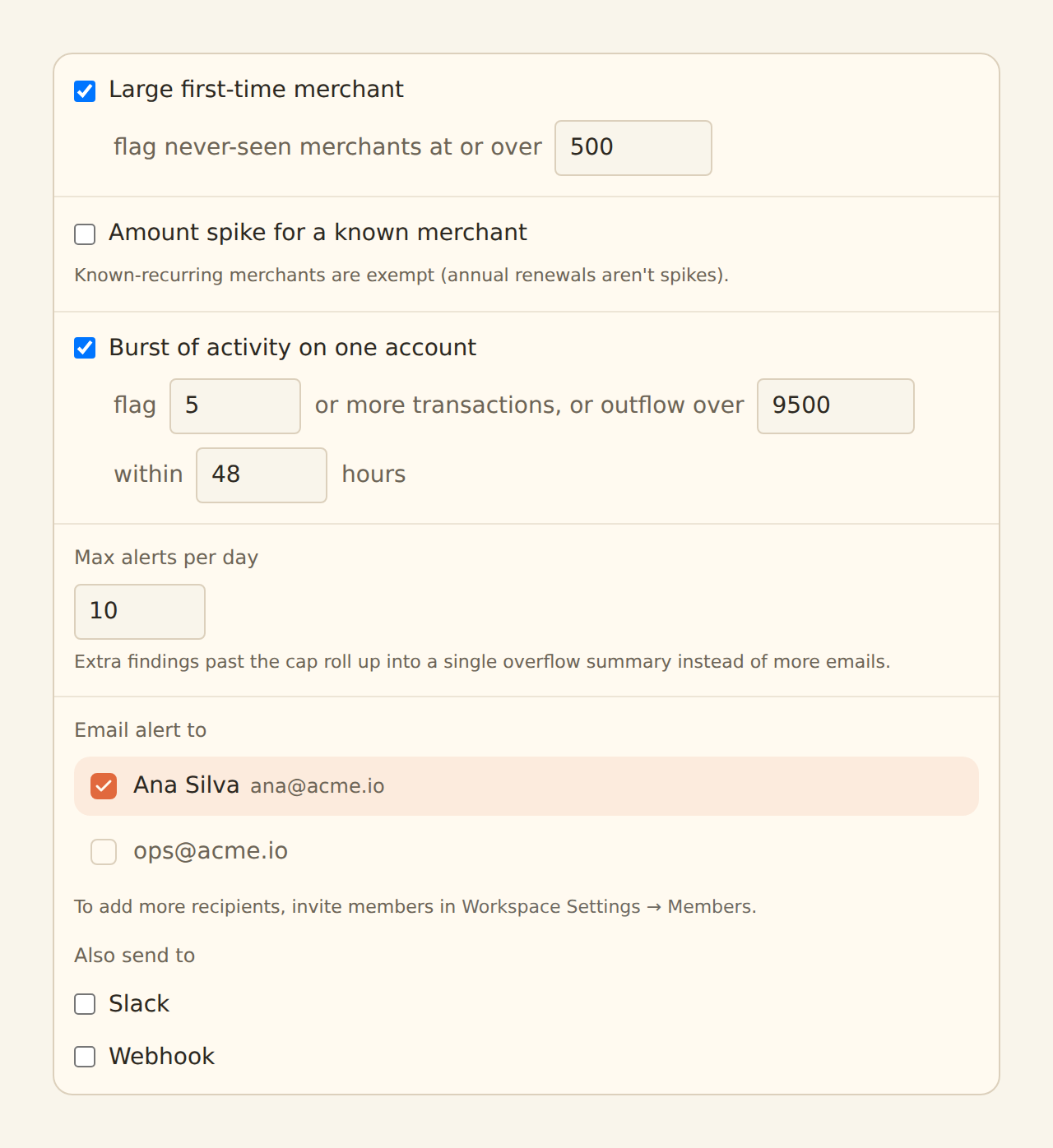
A first-ever charge from an unknown merchant at or over the threshold (default 500, either direction). Small first-time merchants stay quiet — trying a new lunch spot is not an anomaly. On by default.
Amount spike
An outgoing charge far above a known merchant's typical amount — the threshold is in standard deviations (default 3σ, range up to 10). Off by default.
Velocity
Too much, too fast, on one account: at least N transactions (default 5) or at least a total outflow (default 9,500) within a rolling window (default 48 hours, up to 336). On by default.
Two built-in exemptions keep the merchant checks honest:
- Cold start: a merchant's checks stay silent until that merchant has been seen 5 times — there is no "typical amount" to spike against before that.
- Known-recurring merchants are exempt from the spike check. An annual insurance premium is 12× a monthly one and entirely expected; merchants the Recurring Registry recognizes as recurring never trigger amount-spike alerts.
Enable the Recurring Registry alongside it
Alert fatigue is the enemy#
The detector ships with the noisy checks off and hard limits on:
- Daily cap (default 10, configurable 1–100): a sync run stops alerting after the cap; findings beyond it are dropped from delivery but still counted in the sync's enrichment summary, so the run never silently under-reports.
- Cooldown: repeat alerts for the same finding are held back for 24 hours.
- Defaults: new-merchant and velocity on, amount spike off — turn the spike check on once you have a feel for the alert volume.
What the alert contains#
Each alert names the check and the evidence: the record's description, amount, date, and account, plus a plain explanation — "first charge from a new merchant at/over 500", "182.40 is over 3σ above this merchant's typical 12.75", or "7 transactions on one account within 48h". Delivery uses the same email, Slack, and webhook channels as every Watch enrichment.
Setting it up#
Create it
On the Enrichments tab, click "Add an enrichment" and choose Anomaly Detector in the Watch group.
Choose the checks
Keep the defaults (new merchant at 500, velocity at 5 transactions / 9,500 within 48h) to start; add the amount-spike check later if you want it. At least one check must be on.
Set the daily cap
10 is a sensible ceiling. If you regularly hit it, tighten thresholds rather than raising the cap.
Choose where alerts go
Email recipients, a Slack incoming webhook, or a webhook endpoint.
Target the feeds
In the Dependencies tab, tick the transaction feeds to watch, then flip the switch to Enabled.
Expect a louder first sync
Related guides#
- Recurring Registry: builds the merchant history these checks read, and exempts known-recurring merchants from spikes.
- Alert enrichments: explicit per-record conditions when you know exactly what to watch for.
- Feed Monitor: the watcher for sync health rather than record content.
Use this page with your AI assistant
Every BankSync doc is available as plain Markdown for agents and LLMs.