Removing a bank
Remove or disconnect a bank, what happens to its feeds and provider credentials, and how to reactivate within the grace window.
5 min read
On this page
Removing a bank disconnects an institution from your workspace and stops it from powering any feeds. BankSync does this as a soft delete first: the bank is marked for deletion and stays recoverable for a short window before it is removed for good, so an accidental click is easy to undo.
Before you start

Decide: remove the bank, or just pause its feeds?#
Disconnecting a bank is permanent once the window closes, and it eventually revokes the provider connection. If you only want to stop syncing for a while (for example, you are pausing a client or taking a break), do not remove the bank. Instead, turn off the schedule on its feeds and leave the connection in place.
| Goal | Do this | Effect |
|---|---|---|
| Stop automated syncs temporarily, keep the connection | Open the feed, go to the Schedule tab, turn off "Automatically sync periodically" | Connection stays active, no provider revocation, you can still run manual syncs |
| Stop one feed but keep the bank | Delete the feed (see Managing feeds) | The bank stays connected and can power other feeds |
| Remove the institution entirely | Disconnect the bank (below) | Bank is soft-deleted, then permanently removed and its provider connection is revoked |
Pausing keeps your data flowing later
Disconnect a bank#
Remove the connection
Open the Banks page
Select Banks from the navigation. Each connected institution appears as a card.
Open the bank
Click the bank's card to open its detail panel, which lists the bank's accounts.
Click 'Disconnect Bank'
The "Disconnect Bank" button sits at the bottom of the panel. Clicking it opens a confirmation dialog.
Read the confirmation, then confirm
The dialog explains that the bank will be marked for deletion and permanently removed at the end of the month, and that you can reactivate it before then. Click "Disconnect" to proceed, or "Cancel" to back out.
If the bank is still in a feed
What happens after you disconnect#
Disconnecting does not delete everything instantly. BankSync soft-deletes the bank so you have a grace period to undo it.
Grace window
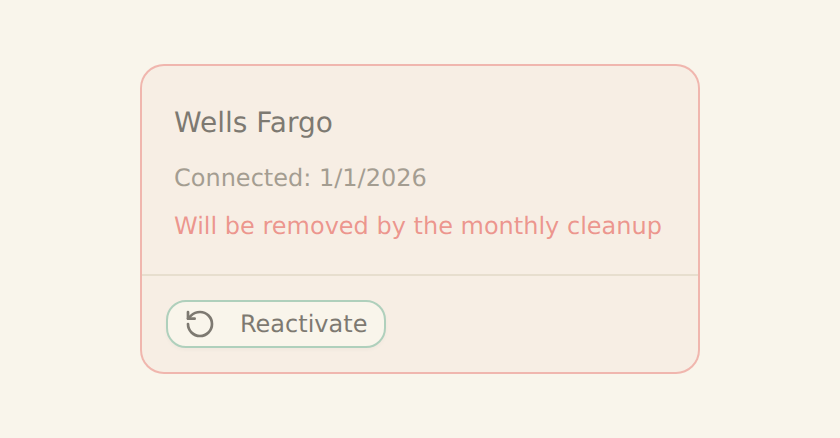
The bank is marked for deletion and stays in your Banks list (greyed out, with a "Reactivate Bank" option) for about 30 days, until the end-of-month cleanup runs.
Feeds stop
Feeds that read from this bank stop receiving its data. Any feed that depends solely on this bank will produce no new rows once the connection is gone.
Credentials revoked
On permanent removal, the underlying provider connection is revoked (for example the Plaid connection is removed or the SnapTrade authorization is revoked). For Australian CDR banks you can also withdraw the data-sharing consent yourself at any time from your bank's data-sharing dashboard.
While the bank is in this state, its detail panel shows a "Bank Scheduled for Deletion" banner noting the date it was marked for deletion. Data already written to your integrations (spreadsheets, databases, Notion, Airtable) by past syncs is not touched by disconnecting.
You cannot reconnect the same bank until removal completes
Reactivate within the window#
Changed your mind? As long as the bank is still marked for deletion (it is still listed and greyed out), you can restore it with no reconnect.
Undo the disconnect
Open the bank
On the Banks page, click the greyed-out card for the bank that is scheduled for deletion.
Click 'Reactivate Bank'
In the yellow "Bank Scheduled for Deletion" banner, click "Reactivate Bank". The deletion mark is cleared and the bank returns to its active state.
Re-enable your feeds if needed
Reactivation restores the connection, but any feeds you removed the bank from must be pointed back at it. Check those feeds in the Feeds tab.
Reactivation counts toward your plan limit
Confirm it worked#
You have removed the bank when:
- The bank's card shows a "Bank is marked for deletion" or "Bank Scheduled for Deletion" state on the Banks page.
- Feeds that read only from this bank no longer produce new data on their next run.
- After the end-of-month cleanup, the bank no longer appears in your Banks list at all, and the provider connection has been revoked.
You have reactivated the bank when:
- The "Bank Scheduled for Deletion" banner is gone and the card is no longer greyed out.
- The bank shows an active state and its accounts are visible again in the detail panel.
Troubleshooting#
Common issues
Manage your feeds
Related guides#
- Managing feeds and Scheduling feeds: stop syncs without removing the bank.
- Reconnecting a bank: refresh a bank that just needs re-authentication instead of removing it.
- Plans and billing: review your bank limit before reactivating.
- Client portals: manage portal-owned bank connections, which only the client can disconnect.
Use this page with your AI assistant
Every BankSync doc is available as plain Markdown for agents and LLMs.