

Your financial history becomes more useful when it lives in a database you control. Keep transactions, corrections and reporting rules there, then let a local model explain selected results. You can revisit last year's spending, rebuild a total after a refund and change models while keeping the same household record.
Start with a question you can settle with a bank statement: how much did this household spend on groceries last week? A quiet home server can collect posted transactions, calculate the answer and ask a small local model to explain the change. The useful part is that next Tuesday you can click the total and see exactly which purchases went into it.
Draw the boundary at the collector
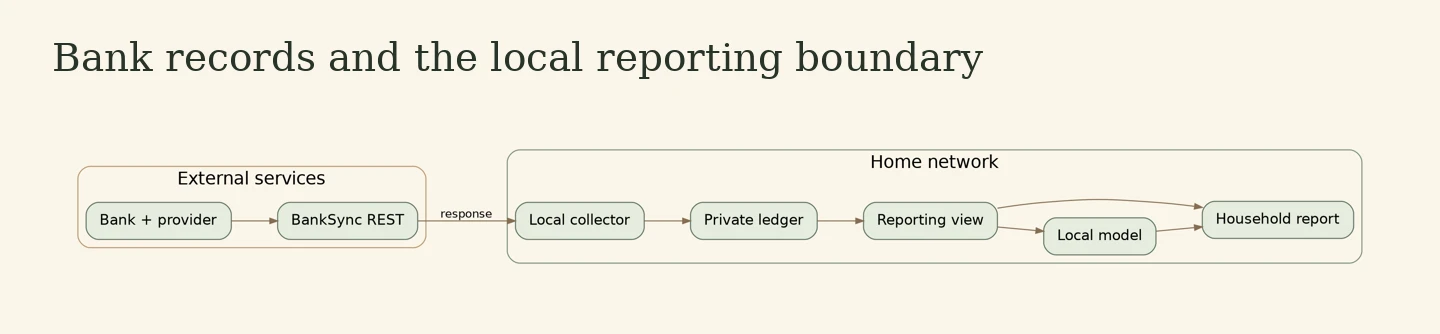
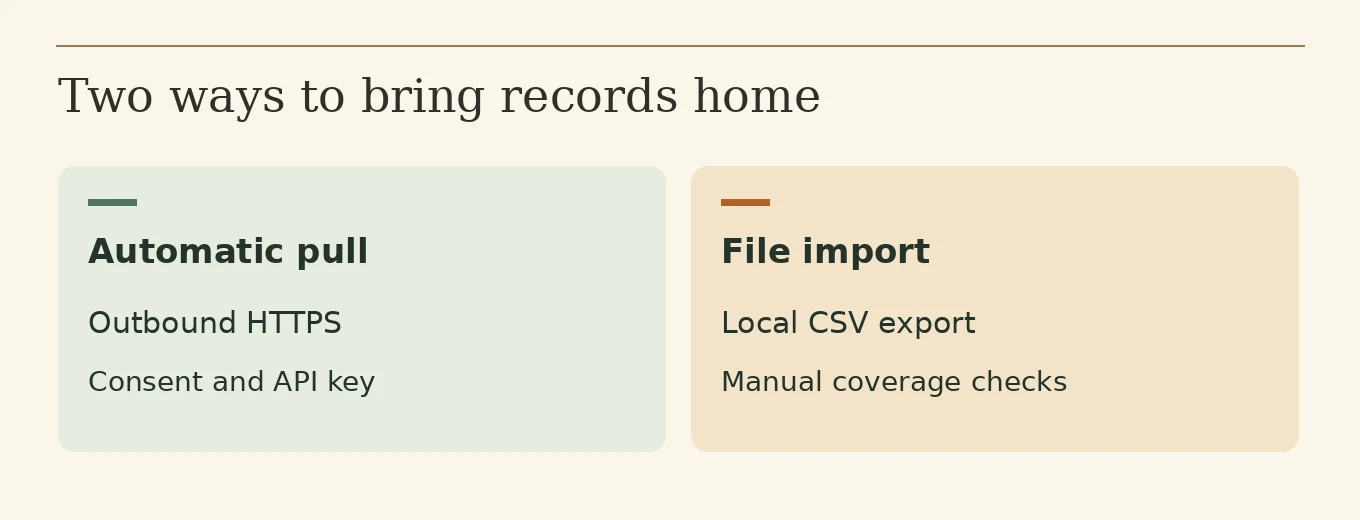
For automatic imports, an authorised bank connection supplies records through BankSync and its connection provider. A collector on your LAN makes outbound HTTPS requests and writes to your database. The model reads a narrow reporting view locally. This keeps both your retained ledger and inference under your control. The bank connection still involves external processing. BankSync describes its data handling and the effect of enabling hosted storage in its privacy policy.
If your requirement excludes a bank-data intermediary altogether, download statements yourself and import the files on the LAN. Keep a register of the accounts and periods those files cover. An empty directory in April tells you nothing about April spending.
What a system of record gives your local model
A model context contains the material supplied for a particular request. Conversation history and retrieval can supply more material, but the application still needs a maintained record of which transactions exist, which corrections were accepted and which periods are complete. Put those facts in the database with stable identities and source references.
That design has four practical benefits. You can reproduce a monthly total from its inputs and calculation version. A reviewed category correction carries into future reports. Different models can answer from the same approved facts. After provisioning the local runtime, you can analyse already imported records during an internet outage, with the last import date clearly visible.
Local inference also gives you control over which machine receives prompts and financial summaries. Use a local-only model endpoint and keep cloud fallbacks disabled. Budget for hardware, electricity and maintenance when comparing costs. Your bank connection still involves BankSync and its provider, as described below.
Save model suggestions separately from accepted corrections. An explanation should reference a report ID, input cutoff and model version. Approving a suggestion creates a recorded change that you can inspect or reverse. A longer context window alone cannot provide these database behaviours.
Choose a first deployment you can repair
For an existing mini PC, put a collector, a database and a small web service on the same host. Run the collector once a day. Give it the only BankSync credential. Give the web service read access to reporting views. Give the model runner a bounded request from that service. A dedicated GPU machine can take over inference later without changing how the ledger is written.
BankSync Standard supports private REST access with a shared budget of ten requests per minute. Managed daily feeds are a separate option. Standard is enough for this example within its bank and usage limits. A process can run around the clock while its source records arrive less often. Display the last complete import and the accounts included. REST guide · Plan comparison
Which version fits your homelab?
| Host | Starting stack | Good reason to pick it |
|---|---|---|
| Repurposed laptop | SQLite, daily importer, local CPU inference | One person maintains it and accepts overnight reports |
| Always-on NAS or mini PC | PostgreSQL, application service, separate model runner | Several household workflows read the same ledger |
| Existing K3s cluster | Scheduled collector, reporting service, backed-up PostgreSQL | You already monitor the cluster and can restore its storage |
Make the first answer inspectable
Pick one reporting currency, two consecutive weeks and a household time zone. In a fictional example, groceries rise from €80 to €104. SQL calculates the €24 difference and the 30% increase. Two shops contribute +€30 and −€6. Those four facts and two internal evidence IDs fit in a small prompt. A helpful model can name the larger contributor. It has no basis to say food prices rose: the family may simply have bought more.
Put the explanation beside a link that opens the underlying rows locally. If one partner's card failed to sync, show a partial report and hide the percentage. Keep the last complete report available with its original dates. A household will forgive a delayed update more readily than a confident answer that quietly omits half the shopping.
A working definition of weekly spending
Write down your rule in the interface: “Posted household expenses, less refunds posted in the same week, excluding transfers between included accounts.” If a partner pays the household back from an account outside the report, decide whether it offsets an expense. Give corrections a reason and a date. With that definition, a family member can disagree about a category without distrusting the entire dashboard.
Bring the first weekly report online
Prove one account
Import one settled statement period. Compare the start and end dates and several known entries before enabling the schedule.
Prove one question
Calculate a total with and without an internal transfer and a refund. Agree on the household rule and keep it with the report.
Prove the boundary
After downloading model weights, disconnect external access for the inference service. Replay a saved summary and open its evidence links.
Prove recovery
Restore yesterday’s database on a spare path. Re-run the same period and confirm the displayed total and row identities.
What belongs on the first screen?
Show the amount, period, currency, coverage and fastest route back to the evidence. Add a single unresolved item such as an unclassified merchant. Leave offer searches and notifications for later. When somebody disputes the number, you want to learn whether the error came from collection, classification or explanation. Keeping those three steps visible makes the next feature much easier to trust.
For a more ambitious build, give a deal-finding worker a queue of offers to fetch from selected public sources. It can bring a dated tariff sheet into the homelab. A different local process prices those offers against household usage, and the model explains the top two eligible candidates. Leave the search worker without a ledger login. That way a public price lookup cannot accidentally include the family's bill, transaction history or policy number.
Build the next part of your system
Planning
- Claude vs ChatGPT vs a Local LLM for Personal Finance
- SQLite, PostgreSQL or DuckDB for a Self-Hosted Finance App?
- Run Your Private AI Finance Stack on K3s Without Losing the Ledger
Connecting and building
- Sync Bank Transactions to Local PostgreSQL Behind Your Firewall
- Can a Small Local LLM Explain Your Spending? Test It With Ollama
- Build a Finance App With Claude Code or Codex Using Synthetic Bank Data
Household projects
- Find Subscription Price Hikes With a Local AI Spending Tracker
- Compare Electricity Plans With Your Own Local AI Bill Analyser
- Compare Insurance Renewals Privately With a Local LLM
- Did Switching Providers Actually Save Money? Build a Savings Ledger
- Put a Private Spending Alert on Your Home Assistant Dashboard