

BankSync is built as a premium financial sync platform for Australia
Connect supported Australian banks through the Consumer Data Right, then send transactions, balances and other available financial data into the spreadsheets, databases and AI tools where work already happens.
Explore BankSync for AustraliaAustralian bank feeds have moved well beyond downloading a CSV once a month.
The Consumer Data Right gives individuals and businesses a regulated way to authorise the sharing of supported banking data with a chosen provider. That creates a strong foundation for automatic bank feeds, but the connection itself is only the beginning.
The real question is what happens after the account is connected.
A basic transaction importer may place new rows into one spreadsheet. A premium bank sync platform should help you decide what data moves, where it lands, how it is structured, when it refreshes and what happens when a run fails.
That distinction matters for finance teams, accountants, investors, operators and spreadsheet power users. Their workflows often begin with transactions, then expand into balances, investment holdings, cash-flow reporting, client workspaces, dashboards, document extraction, databases or AI-assisted analysis.
This buyer’s guide explains what to look for in bank sync software for Australia, how CDR-based connections work and where BankSync fits when you need more than a fixed transaction export.
Why Australian bank sync software is becoming more important
Australia’s Consumer Data Right is an opt-in data-sharing system. A customer chooses what data to share, who can receive it and how long the consent lasts. Banking was the first active CDR sector, and the framework is expanding into non-bank lending as Australia moves towards broader open finance.
For users, the practical benefit is that supported financial data can move through secure, automated channels rather than relying on screen scraping or repeated file exports.
But CDR does not determine the quality of the workflow built on top of the connection. Two services can use the same open-banking foundation and still deliver very different levels of control, visibility and flexibility.
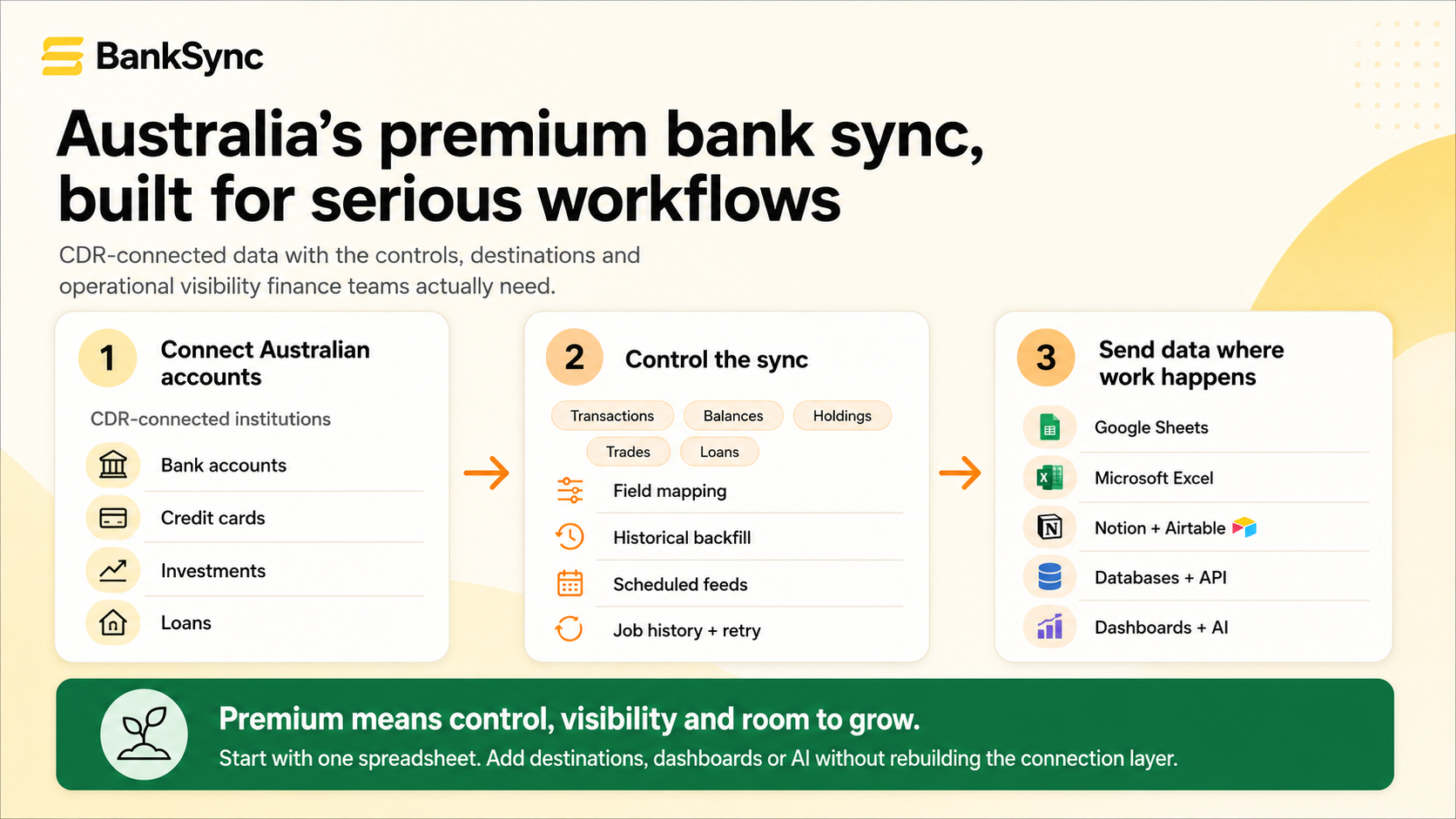
What makes bank sync software “premium”?
Premium does not need to mean complicated or expensive. It should mean that the platform continues to work when your requirements become more serious.
A useful test is whether the product can support the next version of your workflow without making you reconnect every account or rebuild every spreadsheet.
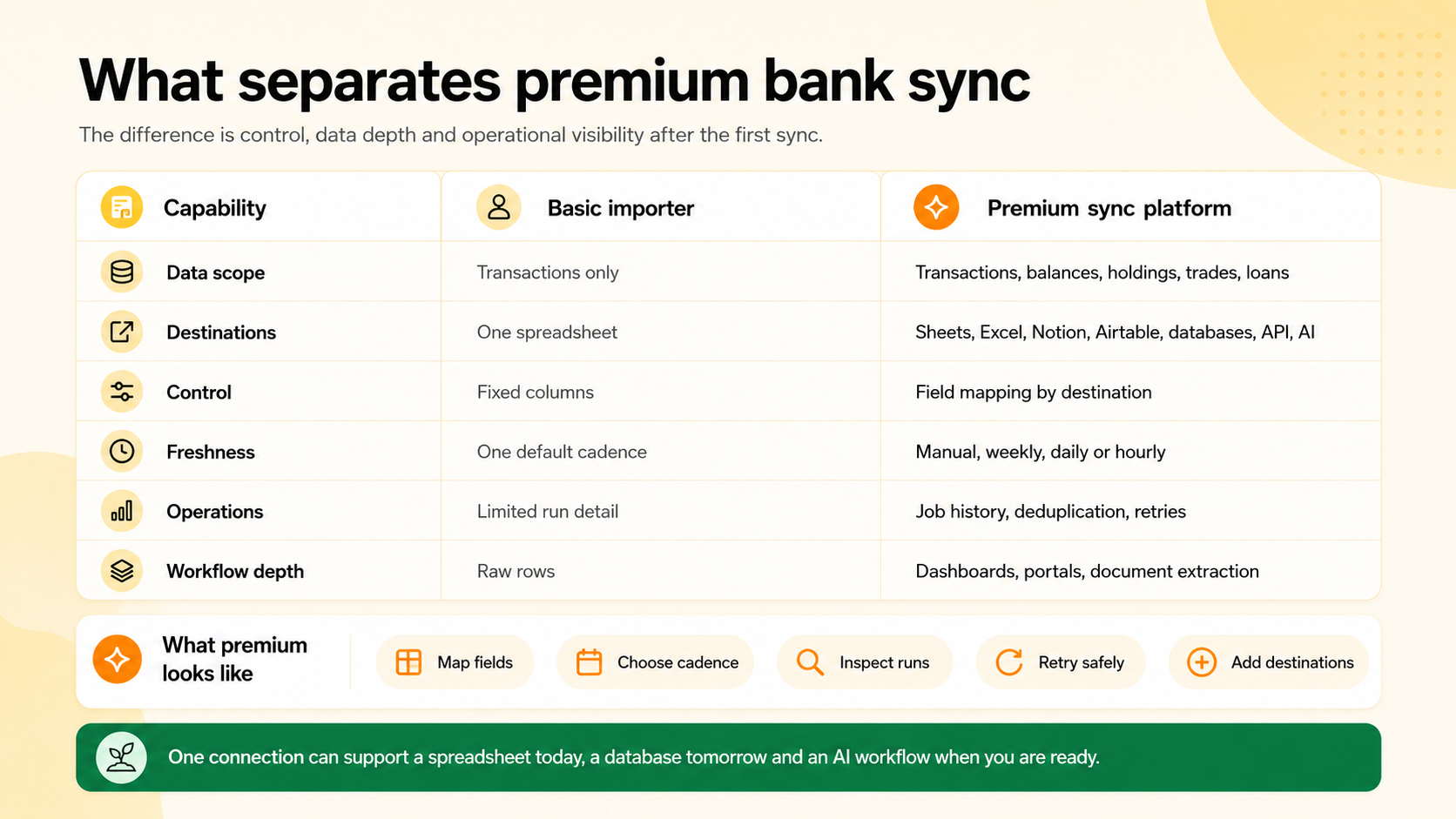
Basic importer versus premium Australian bank sync platform
| Feature | Basic transaction importer | Premium sync platform |
|---|---|---|
| Financial data | Transactions only | Transactions plus supported balances, holdings, trades and loans |
| Destinations | One spreadsheet or fixed app | Google Sheets, Excel, Notion, Airtable, databases, API, dashboards and AI workflows |
| Data structure | Fixed column layout | Configurable field mapping for the destination you already use |
| Sync cadence | One default schedule | Manual, weekly, daily or hourly options depending on plan |
| Historical data | Limited import window or manual files | Initial backfill of the history made available by the institution and provider |
| Reliability controls | Success or failure with little detail | Job history, record counts, chunk progress, error detail, pausing, resuming and retry |
| Growth path | Replace the tool when requirements change | Add destinations, data types, team roles, portals, documents, dashboards and developer access |
Seven capabilities to evaluate before choosing a platform
1. Australian CDR coverage
Start by confirming that the exact institution and account type you use is available. “Supports Australian banks” is too broad on its own.
BankSync currently lists more than 117 Australian financial institutions across major banks, regional institutions, neobanks, mutuals and credit unions. Australian connections are completed through the CDR consent flow via Fiskil, an accredited data recipient.
Coverage still varies by institution, account type and the data supplied through the relevant provider. CommBank and CommBiz, for example, are separate connection experiences because they are separate banking entities.
2. More than transaction rows
Transactions are the most common starting point, but they are not the complete financial picture.
A stronger platform should support the data types needed for cash reporting, investment monitoring and liability tracking. BankSync feeds can carry transactions, balances, holdings, trades and loans where the selected accounts support them. Point-in-time data such as balances and holdings can be appended over time to create a history or updated in place for current-state reporting.
This matters because a cash-flow model, net-worth report or treasury dashboard cannot be built reliably from transaction rows alone.
3. Destinations that match the way you work
The destination should not be chosen for you.
Some users want Google Sheets because it is collaborative and easy to automate. Others need Excel because their existing models use Power Query, pivots, VBA or Microsoft 365 controls. Operations teams may prefer Notion or Airtable, while technical teams may want a database, API or AI assistant.
BankSync supports Google Sheets, Microsoft Excel through Microsoft 365, Notion, Airtable, database integrations and developer access. The same connected account can support several feeds, each with its own destination, data type, mapping and schedule.
4. Field mapping instead of a fixed schema
A premium sync platform should fit your workbook or database rather than forcing you to rebuild around its preferred columns.
BankSync’s mapping layer lets you choose the source fields and the destination columns or properties. A transaction feed might map Date, Description, Amount, Account, Bank and Category into an existing finance model. A balance feed can write account snapshots into a separate tab without disturbing the transaction table.
Field mapping is especially important when you already have formulas, dashboards, templates or downstream automations that expect a stable structure.
5. A schedule that matches the decision
Faster is not automatically better. The right cadence depends on what the data is used for.
A personal spending tracker may only need a weekly update. A business reconciliation workbook may need a daily feed. An operational cash dashboard may benefit from hourly runs.
BankSync provides manual, weekly, daily and hourly options depending on the selected plan. Schedules use the workspace’s local time zone, and a forecast shows upcoming planned runs so the timing can be checked before leaving the setup screen.
6. Visible and recoverable sync operations
The most important reliability features are often invisible until something goes wrong.
Every BankSync run creates a sync job. Historical backfills are split into manageable chunks, records are deduplicated using identifiers supplied by the bank provider, field mappings are applied and the resulting rows are written to the destination.
The job history shows the date range, progress, processed records, written records, duration and errors. Failed jobs can be retried after the underlying issue is fixed, while successful chunks are preserved. Manual and scheduled runs use the same path, so running a feed on demand does not create duplicates simply because a scheduled run is also enabled.
7. A growth path beyond the first spreadsheet
The best platform is not necessarily the one with the longest feature list. It is the one that avoids creating a dead end.
BankSync can extend a bank feed with transaction enrichments, alerts, dashboards, receipt and invoice extraction, client portals, REST API access and MCP tools for supported AI assistants. These capabilities are useful only when needed, but their presence means the financial connection can become a reusable data layer rather than another isolated app.
Read-only Australian connections
CDR consent is scoped and revocable. BankSync does not use the bank connection to move money or change an account.
Multiple destinations
Send supported data into spreadsheets, workspaces, databases, dashboards and developer workflows.
Reliable feed operations
Schedules, job history, deduplication, chunking and retry controls make runs easier to monitor.
More financial data types
Use supported transactions, balances, holdings, trades and loans rather than relying on one export shape.
Configurable structure
Map fields into the columns and properties your existing models and workflows expect.
Room to grow
Add enrichments, dashboards, documents, portals, API access and AI workflows as requirements expand.
How BankSync works for an Australian account
The setup is designed to keep the regulated bank connection separate from the destination and reporting logic.
That separation is useful. You can change a spreadsheet, add a second destination or create a different feed without needing to repeat the bank’s consent flow each time.
Set up an Australian BankSync feed
Connect the Australian institution
Search for the exact bank entity in BankSync, open the CDR consent window and choose the accounts and supported data you agree to share.
Connect the destination
Authorise Google Sheets, Microsoft Excel, Notion, Airtable or another supported integration. Authentication happens with the destination provider.
Choose the source accounts and data type
Select the bank accounts for the feed and choose transactions, balances, holdings, trades or loans where available. Separate incompatible data types into separate feeds.
Map the fields
Choose which source fields land in each spreadsheet column, database property or destination field. Include Bank and Account when several institutions share one table.
Choose the schedule
Run the feed manually or select a weekly, daily or hourly cadence available on the workspace plan. Confirm the local time and upcoming schedule forecast.
Run, verify and monitor
Complete the first backfill, open the destination to confirm the structure and then use job history to inspect future runs, errors and record counts.
Where premium Australian bank sync creates value
| User | Typical workflow | Why platform depth matters |
|---|---|---|
| Finance team | Daily transactions to Excel, weekly balance history and a management dashboard. | Separate feeds and schedules keep the operational model clean. |
| Accountant or bookkeeper | Client-owned bank connections feeding isolated portal workspaces. | Roles, portals and cross-workspace controls reduce credential sharing and data mixing. |
| Investor or adviser | Cash accounts, supported holdings and trades feeding one reporting model. | Multiple financial data types provide more context than transactions alone. |
| Spreadsheet power user | Mapped bank data underneath formulas, pivots, charts, VBA or Apps Script. | A configurable schema protects the model already built around the data. |
| Operations team | Transactions into Airtable or Notion with categories, alerts and automations. | The sync becomes part of an operational workflow rather than a static report. |
| Developer or AI team | Structured data through the REST API, database integrations or MCP tools. | One financial connection can serve software and agent workflows as requirements mature. |
The same CDR connection can support different outputs when each workflow has its own feed, mapping and schedule.
Choosing the right level of BankSync
A premium platform should still allow a simple starting point.
BankSync uses the same institution coverage across its paid plans. The main differences are capacity and workflow depth: the number of connections and feeds, schedule cadence, document volume, team roles, portals, API rates, MCP rates and enrichment availability.
For a single Australian account and a weekly spreadsheet update, a smaller plan may be enough. Daily feeds, several banks and API access point towards Standard. Hourly syncing, unlimited feeds, team roles and client portals are available on Professional and above.
The useful principle is to pay for the operating model you need now while keeping the same connection layer available when the workflow grows.
Frequently asked questions
Australian bank sync software FAQs
The bottom line
A premium Australian bank sync platform should not be judged only by how quickly it puts the first transaction into a sheet.
Judge it by what happens next: whether you can choose the data, map the structure, select the cadence, inspect every run, recover from failures and add new destinations without rebuilding the financial connection.
BankSync is designed around that broader model. Australian CDR connections are the foundation. Field-mapped feeds, multiple destinations, operational job controls, enrichments, dashboards, document extraction, portals, API access and AI tools are the layers that make the connection useful over time.