
Your offset rose by A$2,000 on Friday. Did the household save A$2,000, or did you move it from the everyday account? In this example the everyday balance fell by exactly the same amount. There is more cash in the offset, and the household still holds A$20,000 across the two accounts.
This distinction matters when you run a business and the amount of personal income you take home varies. A line chart of the household offset answers “What balance did we observe on Friday?” A separate spending report explains where household money went. This guide builds the first in Google Sheets and shows how to read it alongside the second.
One household, two balances and one transfer
| Account | Thursday | Friday |
|---|---|---|
| Everyday transaction account | A$8,000 | A$6,000 |
| Linked offset account | A$12,000 | A$14,000 |
| Total household cash in these two accounts | A$20,000 | A$20,000 |
Confirm which account the lender treats as an offset
An offset is a separate deposit account linked to a home loan. Redraw is access your lender may give you to extra repayments already made on the loan. Check the linked account in online banking or on a statement, especially if you have more than one home loan or recently changed products. A balance feed alone cannot confirm the lender has applied the link. ASIC Moneysmart’s offset guide
Pick one eligible AUD offset account to start. Give the spreadsheet a clear scope such as Household offset observations. A business trading account belongs in its own business cash report. If several accounts have similar display names, use separate feed tabs or an unambiguous account identifier available in your mapping.
Send balance snapshots to a dedicated tab
Set up the Google Sheets feed
Authorise the account
Under Banks, search for the exact Australian institution. Follow the CDR authorisation flow and select the offset account if the bank offers it for sharing. Return to BankSync and check that the account is present. Availability depends on the bank and account.
Create the destination
Create a Google spreadsheet with two tabs called Snapshots and Daily. Connect Google Sheets from BankSync’s Integrations tab using a Google account with edit access. In a new feed, choose Balances as the data type and select the single offset account.
Map the snapshot
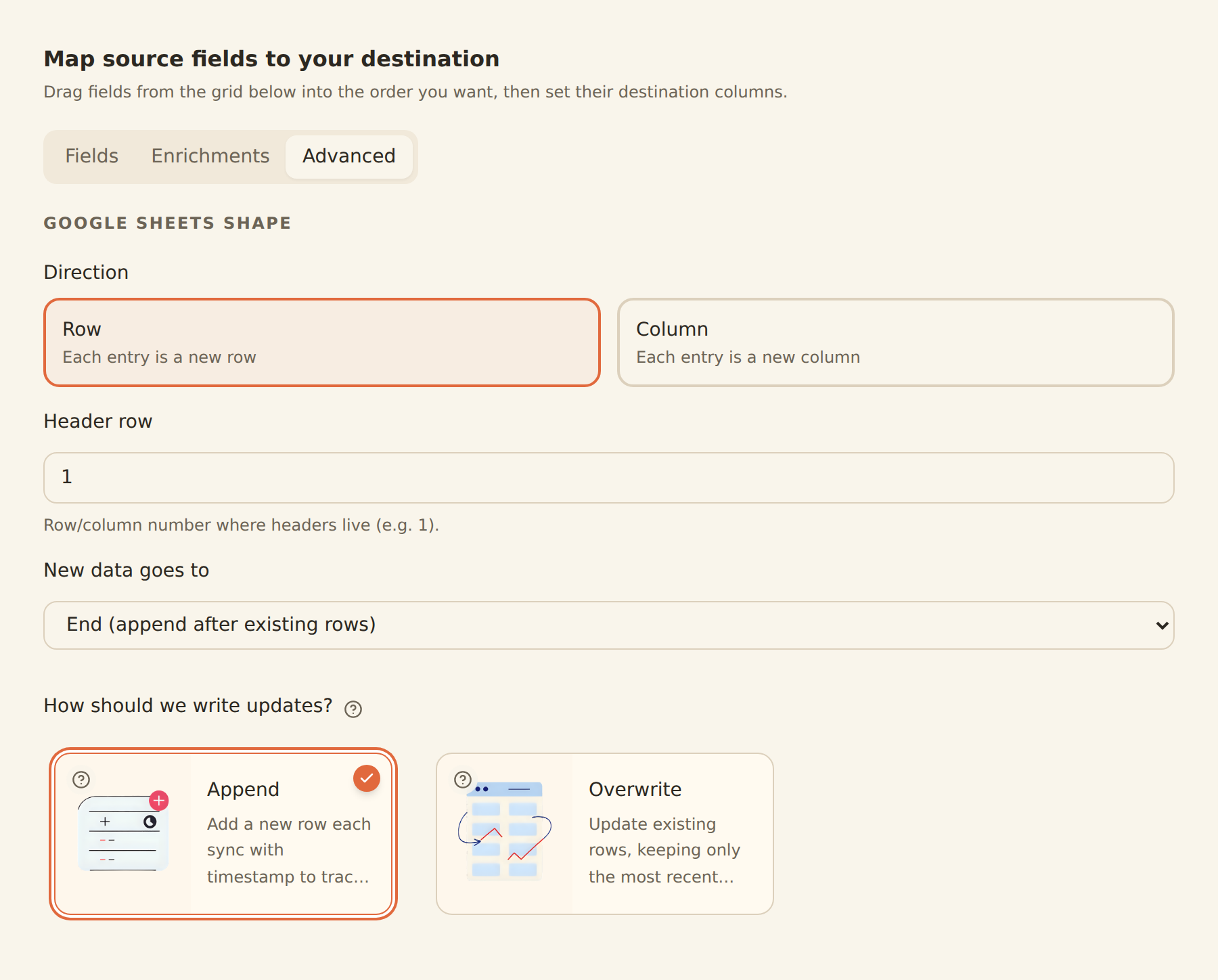
Choose your spreadsheet and Snapshots as the destination. Map A to As Of Date, B to Account Name, C to Current Balance and D to Currency. Use a header row, write by row, and add new rows at the end. Use Current Balance consistently rather than switching between current and available balances.
Begin the history
Choose Append to keep a timestamped observation on each spreadsheet sync. Run once, inspect the first row and set a schedule available on your plan. Overwrite is useful for a latest-balance display, but it will replace the observation you need for this chart.
The first sync records the balance available at the time. It cannot recreate historical daily balances. Australian CDR data typically refreshes about once a day, and a more frequent sync may read the same figure again. A daily feed needs a plan that supports daily scheduling. If you only have weekly observations, label the series weekly. Australian bank data and cadence · Balance feeds and write modes · Google Sheets mapping
Chart one observation for each date
On Daily, enter the source account name exactly as it appears in Snapshots into B1. Put Date in A4 and Observed offset balance (AUD) in B4. Enter a real calendar date in A5 and list consecutive dates below it. Choose the household’s time zone in the spreadsheet settings. Check that the snapshot timestamps are recognised as date/time values and column C contains numbers. Spreadsheet location and time settings
Paste this formula in B5 and fill it down the dated rows. It looks for that account and currency during the day in column A. Reading the raw tab from the bottom returns the last appended matching row, including when you run the feed twice on one day. Leave the source rows in their original append order.
=XLOOKUP(1,ARRAYFORMULA((Snapshots!A$2:A>=A5)*(Snapshots!A$2:A<A5+1)*(Snapshots!B$2:B=$B$1)*(Snapshots!D$2:D="AUD")),ARRAYFORMULA(IF(ISNUMBER(Snapshots!C$2:C),Snapshots!C$2:C,"")),"",0,-1)
Create a line chart from the two columns on Daily. The empty-string argument leaves a missing day blank and the final -1 searches from the last row upwards. Treat a blank as a gap to investigate. A genuine A$0 balance is still a number. Label the chart Last observed offset balance, since the last sync of the day may precede the lender’s cut-off. Google Sheets XLOOKUP reference
Three quick checks before using the chart
| Try this in a copy | What Daily should show |
|---|---|
| Record A$12,000 and then A$14,000 for the same day and account | A$14,000. Adding them would show a fictitious A$26,000. |
| Leave the next date without a matching snapshot | A blank. Check the feed history before drawing a conclusion. |
| Add a snapshot containing a numeric A$0 | A$0. Zero and a missing observation mean different things. |
Explain a change without counting the same money twice
For a household spending review, use a separate Transactions feed and a separate tab. In the opening example, tag the A$2,000 debit from everyday and the A$2,000 credit to the offset as the two sides of the same internal transfer. Exclude that pair from household income and spending, keeping both bank rows for checking. Verify the accounts, reference and posting dates before pairing them. Equal amounts alone are weak evidence.
A supermarket payment from the offset is different. It reduces the offset balance and is an external household purchase. If the offset is the only connected account, an inbound transfer explains its balance change but cannot establish the change in all household cash. BankSync transaction feeds
Common questions
Product instructions and sources checked on 2 November 2026.