
Excel can be a strong MTD working paper when you give it a clean data boundary. The problem is not the workbook. The problem is mixing bank imports, VAT decisions and filing summaries in the same editable range.
An automatic bank feed lets you keep the Excel structure you already use while replacing repeat CSV exports with an authorised source of transactions. BankSync supplies that source layer for supported UK bank accounts; compatible MTD software or a bridging workflow remains responsible for sending any update or return to HMRC.
For VAT, a bank feed is not a VAT return. It helps collect and organise bank activity. You still need to review VAT treatment, retain valid evidence and use compatible software for the submission workflow.
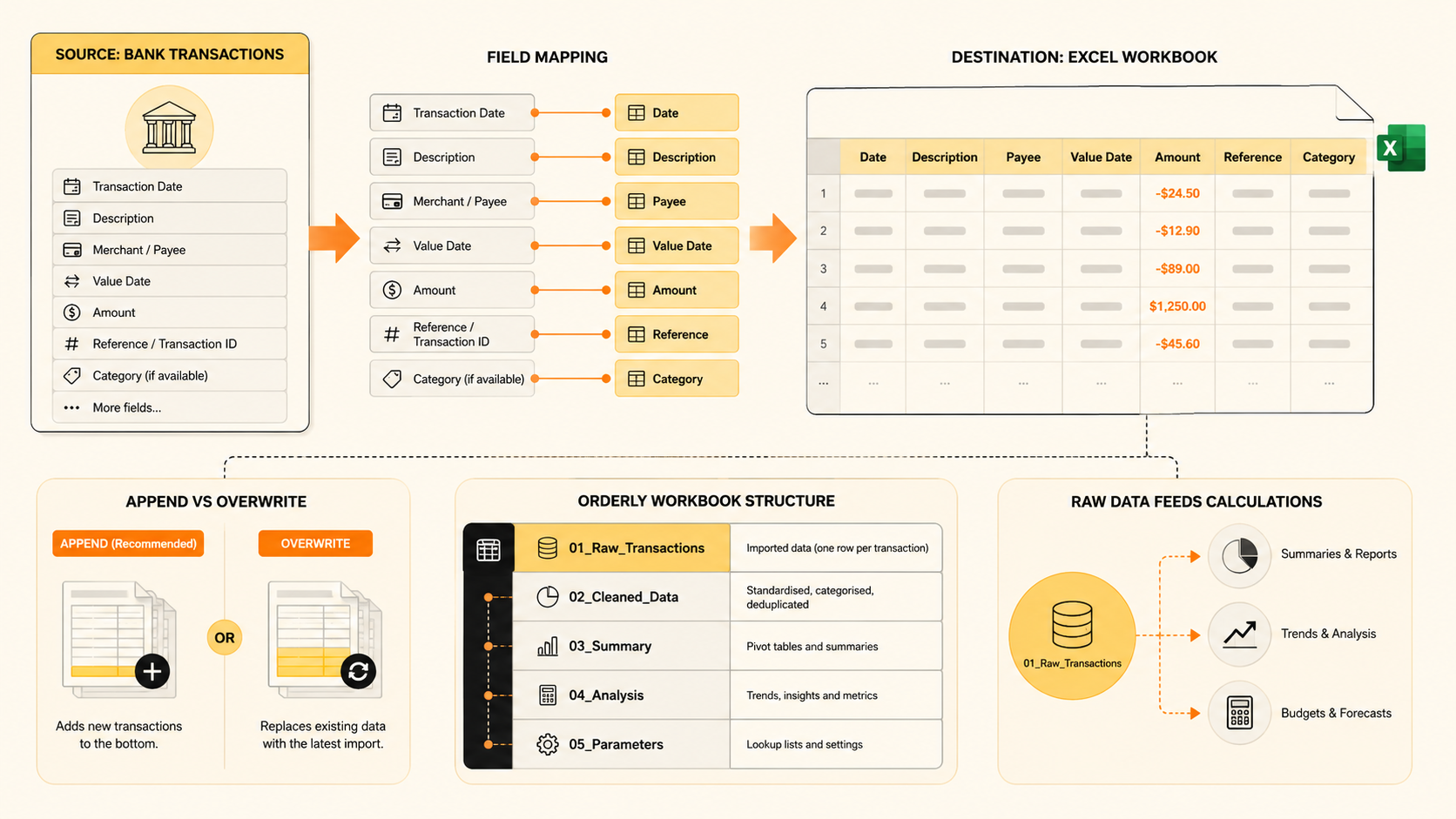
Spreadsheets can sit inside a digital VAT process
HMRC says that businesses can use compatible software or other software, including spreadsheets, that connects to HMRC systems to keep the required digital VAT records. Where more than one product is used, records need to be linked digitally; HMRC lists formulas linking cells in spreadsheets as one example of a digital link.
Read HMRC's current VAT record-keeping guidance for the detail that applies to your business. All VAT-registered businesses should now be signed up for Making Tax Digital for VAT unless an exemption applies.
The useful question is not, “Can Excel do everything?” It is, “Which part of the process should Excel own?” For most teams, Excel is ideal for structured review, working papers, checks and summaries. It should not be asked to replace the compatible software that is responsible for sending the return.
Use a five-sheet workbook architecture
- Bank_Transactions receives the mapped feed of source bank rows. Do not manually edit descriptions, amounts or transaction IDs here.
- Rules holds merchant mappings, categories, VAT codes and review settings. Keep raw data imports out of it.
- Review_Queue shows uncategorised rows, exceptions and transaction checks. It is not where final VAT figures belong.
- VAT_Control summarises reviewed figures by VAT period and provides checks. Do not let the bank feed write into it directly.
- Submission passes reviewed figures into your compatible software's approved route. Do not use manual copying as a substitute for the required digital link.
This architecture has an unglamorous advantage: a refresh cannot wipe out the formulas or audit notes your team has already added.
Map the bank feed into a stable Excel table
Set up the raw sheet as an Excel Table and keep the columns predictable:
- transaction date;
- description;
- amount;
- currency;
- account name or account ID;
- transaction ID; and
- sync timestamp.
Use the transaction ID and account reference to help detect a row that already exists. Keep the feed append-oriented. If a bank corrects or reverses something, preserve the original record and show the adjustment instead of silently overwriting history.
Then move the judgement work outside that source table. You can use rules or lookups to suggest a category, but route unfamiliar merchants and unusual values to a review queue. A formula can give a starting point; it cannot confirm the VAT position by itself.
A safe MTD Excel workflow
- Keep original bank fields intact. They provide the quickest route back to the underlying activity when something needs explaining.
- Add review fields beside or downstream from the feed. Typical examples include category, VAT treatment, receipt link, client/project, reviewer and exception status.
- Check the tax point. A bank payment date is not always the date that determines the VAT period. HMRC's guidance explains that the tax point can depend on the supply, invoice and payment timing.
- Match claims to evidence. A bank line alone may not show the VAT you can reclaim. Keep the relevant invoices and supporting records in the workflow.
- Use the compatible submission route. Your selected software or bridging process should turn the reviewed records into the required VAT submission. Verify its current requirements before each filing period.
What a bank feed cannot decide for you
There are some things that should stay deliberately manual or be reviewed by a suitably qualified person:
- whether an expense is business-only, mixed or private;
- the VAT rate and treatment for a sale or purchase;
- whether a payment relates to an invoice, deposit, refund or financing item;
- how to deal with a correction, bad debt, reverse charge or adjustment; and
- whether a source document is sufficient for a claim.
That is not a flaw in automation. It is the reason to automate collection and preserve human review where the accounting judgement lives.
Frequently asked questions
Can I submit an MTD VAT return directly from an Excel file?
You need compatible software that connects to HMRC's systems for the submission route. A spreadsheet can be part of the record-keeping process, but confirm the exact workflow with the software provider.
Are Excel formulas a digital link?
HMRC lists formulas linking cells in spreadsheets as an example of a digital link. Whether your full workflow meets the rules depends on how the records move between the spreadsheet and the software you use, so check current HMRC and provider guidance.
Will the feed overwrite my VAT rules?
Not if you keep raw bank data in its own mapped table and maintain VAT rules, formulas and review notes separately. That separation is the key design decision.
Start with the raw data layer
You do not need to rebuild the Excel workbook that already runs your business. Add a controlled source tab, keep the review and VAT logic beside it, and use your compatible MTD software for the submission stage.