

Your Excel report has “Travel”, “Transport” and “Train fares” for the same kind of journey. The totals are mathematically correct but harder to compare.
A small category vocabulary and a reviewed mapping can fix that. BankSync's Lookup Table enrichment can map a known merchant or description to a target field before the record reaches your destination.
Start with recurring, unambiguous descriptors. Leave mixed-purpose purchases for review. The goal is fewer repetitive decisions, not automatic certainty about every payment.
Reviewed on 1 November 2026. Merchant strings and categories below are fictional examples.
A small category vocabulary
| Observed description | Reviewed category | Reason |
|---|---|---|
| EXAMPLE RAIL | Travel | Recurring rail provider |
| EXAMPLE CLOUD | Software | Known subscription |
| EXAMPLE STATIONERY | Office supplies | Known dedicated supplier |
| GENERAL MARKETPLACE | Needs review | Purchases can have different purposes |
Define the vocabulary before the mapping
Write a one-line definition for each category. “Travel” might include work journeys in a business tracker, or household transport in a personal tracker; those are different scopes.
Keep the original description and any source category available. Your reviewed reporting category is an interpretation, and retaining the source makes later corrections easier.
For a business, agree the vocabulary with whoever maintains the accounts. A vendor-to-category mapping is not automatically a correct tax or ledger-code decision. Mixed purchases, refunds and unusual transactions may require a different treatment.
Avoid creating a new category for every merchant. Categories answer “what kind of spending?” while merchants answer “who received the payment?” You can report by either without forcing them to be the same field.
Choose a matching rule that fits the source
The Lookup Table documentation describes exact, normalized and contains modes. Exact ignores case and surrounding whitespace. Normalized matching removes certain descriptor noise. Contains matches text fragments, with the longest matching key winning.
Choose deliberately. A fragment such as “SHOP” is likely too broad for useful categorisation. Even normalized matching needs sample review; cleaning a descriptor does not establish the purpose of a purchase.
The target must be an enrichable field for that data type, and it must be mapped to your destination if you want to see the result in Excel.
Choose the mode by the problem
| Mode | Useful when | Check before enabling |
|---|---|---|
| Exact | You control a clean, consistent key | Variants that should remain unmatched |
| Normalized | The same merchant has noisy descriptors | Different merchants do not collapse together |
| Contains | A distinctive fragment identifies the intended group | Short generic fragments do not overmatch |
Build a small pilot
Select a limited set
Choose five or ten recurring descriptors with clear categories.
Create the Lookup Table enrichment
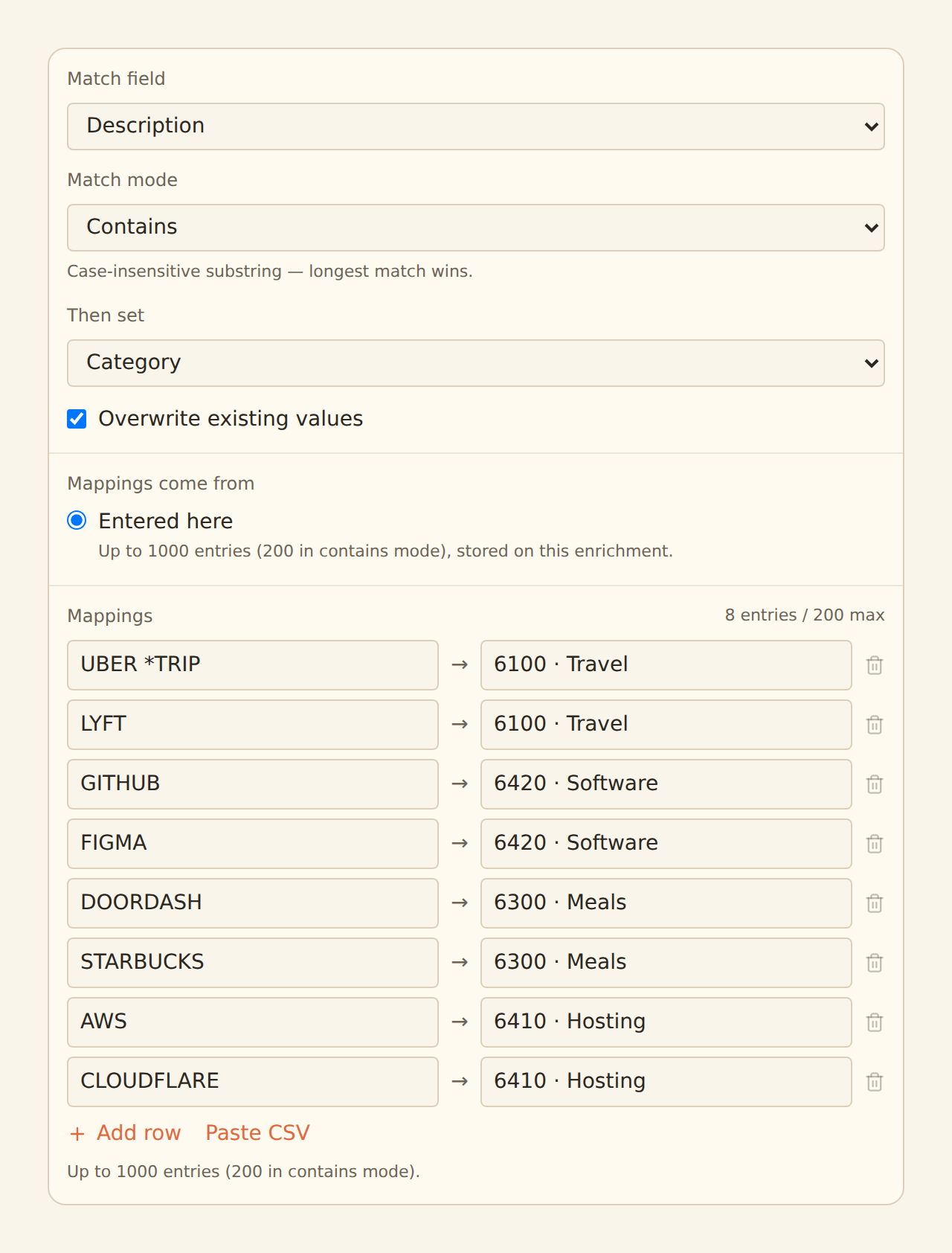
Use Enrichments → Add an enrichment → Lookup Table, or the feed's Mapping → Enrichments area.
Choose match and target fields
Select the source descriptor and the enrichable reporting field.
Enter reviewed pairs
Add each match key and its target value; resolve any reported key collisions.
Attach to the intended feed
Confirm dependencies and enable only after checking the preview.
Inspect the destination
After a normal sync, confirm the category lands in the intended Excel column.
Decide who wins when a value already exists
By default, the lookup fills empty target fields. Overwrite existing values changes that behaviour. Make this a conscious policy: should the mapping supplement existing classification, or replace it?
The documented enrichment order places lookup tables after Memory and before Rulesets. If a later rule changes the category, the final preview can differ from the lookup's own mapped value.
For a pilot, record the original category, expected final category and reason for each test. Include a case with a nonblank category so you can see whether your overwrite choice does what you intended.
Do not assume changing a lookup rewrites every historical row already delivered to Excel. Verify the scope of any replay or historical correction before running it; an uncontrolled replay can create duplicate spreadsheet records.
A review set that catches common mistakes
| Test record | Expected outcome | Failure caught |
|---|---|---|
| Known descriptor, blank category | Mapped category appears | Missing mapping or dependency |
| Known descriptor, existing category | Preserved unless overwrite intended | Unexpected replacement |
| Similar unrelated merchant | No incorrect match | Overbroad key |
| Two matching fragments | Most specific intended key wins | Ambiguous contains rules |
| Unknown merchant | Remains visible for review | False confidence from automatic coverage |
| Refund from known merchant | Category reviewed in context | Treating all merchant activity as purchases |
Measure useful progress
Track how many records still need review and how many sampled mappings required correction. A high match rate is not enough if broad keys put unrelated purchases into the same category.
When an exception reveals a better mapping, update the definition and note why it changed. Test neighbouring descriptors before expanding the rule.
For Excel reporting, retain a stable category vocabulary across periods. If you rename a category, decide how historical reporting should treat the old label; otherwise one concept can split into two chart bars.
The monthly spending-report guide shows how those reviewed categories feed a PivotTable. The Excel integration guide covers the destination and column mapping.
Keep the system small enough to maintain
Start with the recurring merchants that create the most repetitive work. Add complexity only when the examples justify it.
Keep an owner for the category definitions and mapping review. A shared table is useful because people can inspect the same decisions; it becomes less useful if everyone silently changes the rules.
Lookup enrichments, Excel lookup formulas and BankSync Table relation lookups are different mechanisms. This article uses the enrichment that transforms syncing records. Naming that distinction in your handover avoids someone trying to repair the wrong layer.