

The first milestone for a new bank connection is not “transactions appeared”. It is “these records belong to the right account, cover the period I expect, and reconcile to the bank”.
If you use Actual Budget with supported UK accounts in BankSync, SimpleFIN provides the connection between them. This guide concentrates on the first month: start with one account, verify the link and build a repeatable review.
The outcome: a budget ledger you can explain, with a known history boundary and a clear way to investigate a missing payment.
Reviewed against BankSync and Actual Budget documentation on 1 November 2026. Figures and account labels are illustrative.
Understand the three responsibilities
| Layer | Responsibility | Your first check |
|---|---|---|
| UK bank connection | Makes supported account data available to BankSync | Correct bank entity, account and valid consent |
| BankSync SimpleFIN access | Exposes selected accounts to the app | Preview contains the intended accounts |
| Actual Budget | Maps accounts, imports and manages your ledger | Each source account links to the right ledger account |
Before connecting, choose a small scope
Confirm your Actual installation supports bank sync and uses actual-server. Actual's bank-sync documentation explains that bank-sync credentials are stored on the server and are not protected by budget end-to-end encryption. Choose a server and administrator you trust.
In BankSync, verify the UK account is connected and current. The UK guide describes connection-specific availability and approximately 60 days of initial history. Do not assume a newly connected account will supply a full year.
If your Actual ledger already contains transactions, preserve a backup and record its latest reconciled date before linking. Connecting an existing ledger is different from starting an empty one.
Connect one account and inspect it
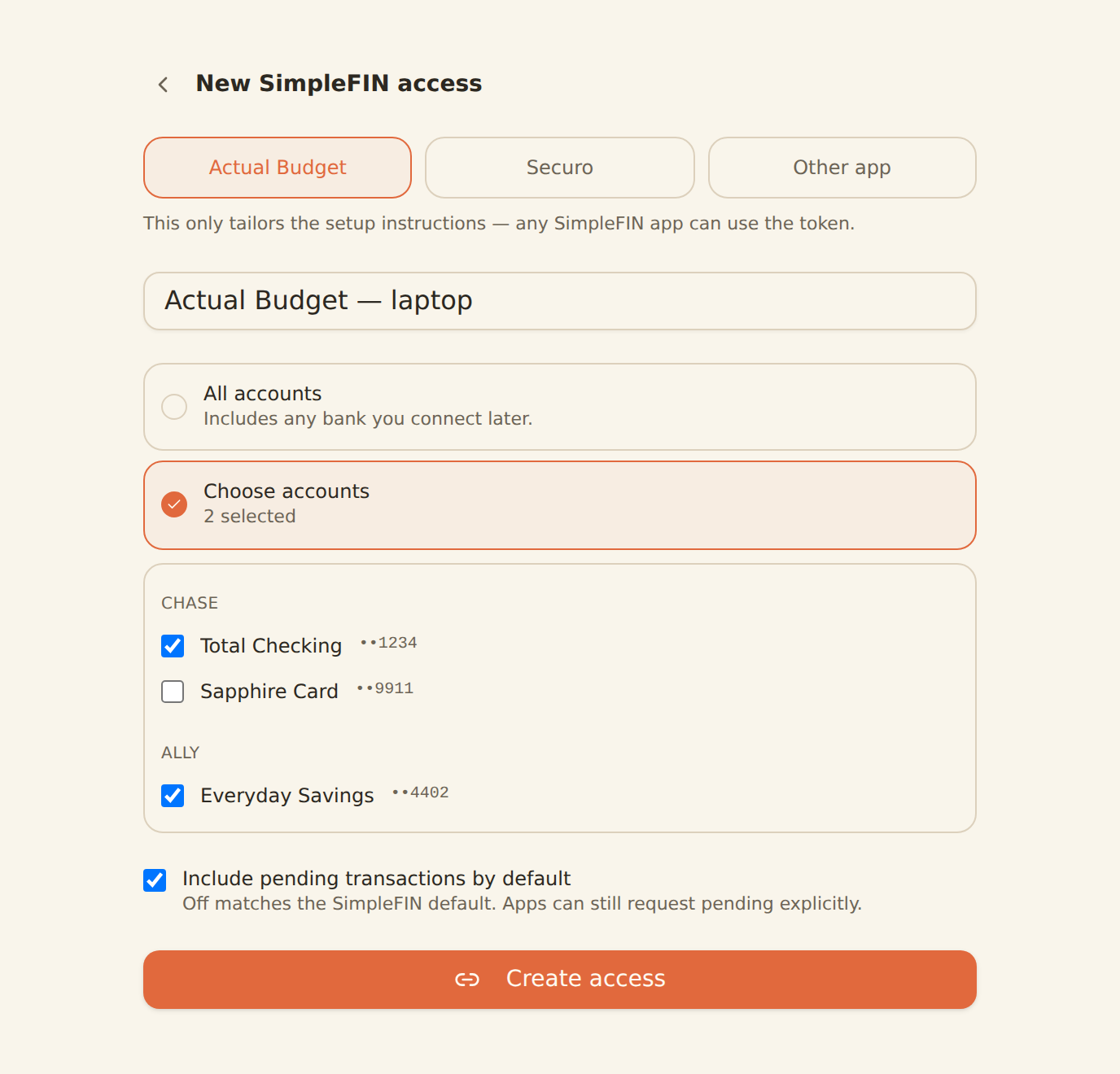
Create scoped access
As a BankSync workspace Admin or Owner, open Settings → Developers → SimpleFIN → Create access. Choose Actual and only the accounts needed.
Preview the response
Check account identities and reported errors before moving to Actual.
Use the BankSync setup token
In Actual's bank-sync setup, choose SimpleFIN and paste the token issued by BankSync.
Map the account deliberately
Choose the correct existing Actual account or create the intended new account; avoid a second copy of an existing ledger.
Run a bank sync
Inspect a known purchase and incoming payment before adding more accounts.
The BankSync SimpleFIN guide is the authority for obtaining a BankSync token. SimpleFIN Bridge is a separate service; you do not need a Bridge token for this route.
Actual's current SimpleFIN setup guide shows the app-side flow through Add account, Set up bank sync and the SimpleFIN provider. Its Bridge-specific bank coverage and refresh descriptions do not describe BankSync's UK connection.
A setup token is a credential, not a shareable configuration example. Paste it into the intended app and keep it out of screenshots, support posts and shared notes.
First-sync acceptance checks
| Check | Illustrative test | Why it matters |
|---|---|---|
| Identity | Household current maps to Household current | Names alone can be ambiguous |
| Sign | A £35 purchase is an outflow | Reversed signs distort the ledger |
| History | Earliest imported date matches what is available | Connection does not guarantee older records |
| Opening position | Starting balance fits the imported period | Avoid counting existing money twice |
| Duplicates | Known payments appear once | Existing manual or file records may overlap |
| Currency | Account currency is correct | Avoid comparing unlike units |
Reconcile before refining categories
Use the bank's statement or finalised transaction list for a clearly defined date. Compare it with Actual's ledger for that account.
Actual's reconciliation guide documents the cleared status, reconciliation tool and final Lock transactions action. Follow that process after investigating differences; do not add an unexplained adjustment merely to make the difference disappear.
For an illustrative account, an opening £1,200 plus £2,000 received minus £1,450 paid gives £1,750. If the matching bank closing figure is £1,715, investigate the £35 difference. A missing £35 purchase is one possibility, but so are timing, duplication and a wrong opening balance.
Reconcile each account separately before checking transfers between them. A household-wide total can conceal a payment attached to the wrong account.
Establish a first-month rhythm
During the first week, review after a few real transactions have posted. Confirm the account mapping and resolve duplicates while the set is small.
During the next weeks, check exceptions before adjusting your categories. A newly observed merchant may need classification; a missing record needs a different investigation. Keep both visible.
At month end, reconcile to a bank figure for the same scope and date. Record the completed review and any unresolved issue before using the totals to change next month's plan.
Actual's current documentation says automatic bank syncing is off by default and runs while Actual is open when enabled. Check your installed version and settings instead of assuming BankSync's own feed schedule controls the app. Fetching more frequently also cannot make the bank publish a record earlier.