

סנכרון Dell Financial Services (Credit Account) אל Microsoft Excel
ייתכן ש-BankSync תומך בחיבור לחשבונות Dell Financial Services (Credit Account) דרך ספקי בנקאות פתוחה חיצוניים, ואז מנתב את נתוני החשבון הנתמכים שמוצגים למטה אל Microsoft Excel. ההגדרה לוקחת פחות מ-10 דקות ולא דורשת קוד.
איך לסנכרן את Dell Financial Services (Credit Account) אל Microsoft Excel
חיפוש Dell Financial Services (Credit Account) ב-BankSync
נרשמים ל-BankSync, ואם Dell Financial Services (Credit Account) זמין, מחברים את החשבון דרך תהליך הרשאה שמתארח אצל הספק או אצל הבנק. BankSync לא שומר את פרטי ההתחברות שלך לבנקאות המקוונת.
אישור גישה אל Microsoft Excel
מאשרים ל-BankSync לכתוב נתונים אל סביבת העבודה שלך בתוך Microsoft Excel. בוחרים את מסד הנתונים, הטבלה או הגיליון שאליהם יגיעו נתוני החשבון הנתמכים.
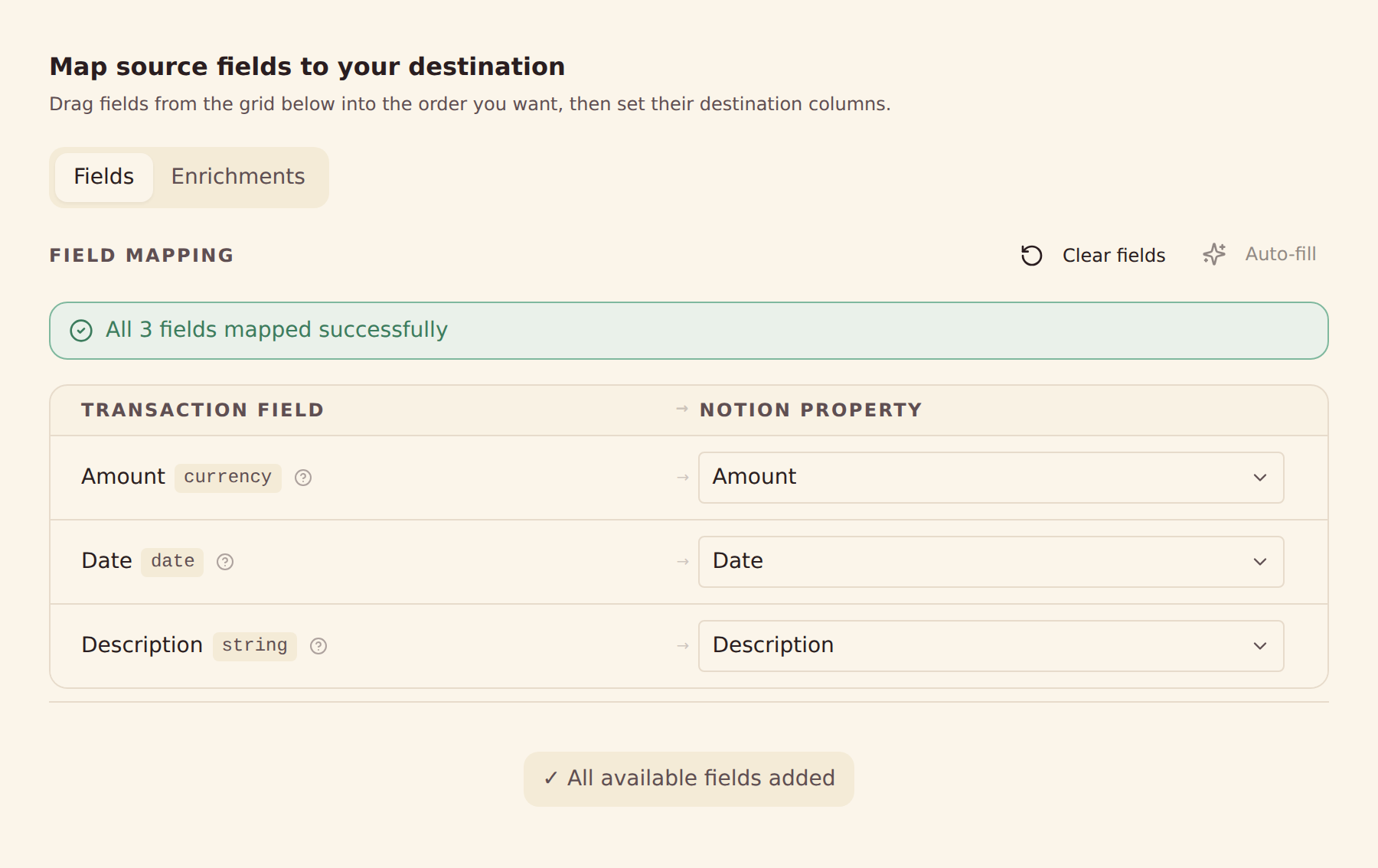
הגדרת מיפוי שדות
ממפים את שדות Dell Financial Services (Credit Account) הנתמכים שמספק הספק אל עמודות בתוך Microsoft Excel.
קביעת לוח זמנים לסנכרון
אפשר לבחור סנכרון אוטומטי כל שעה, כל יום או כל שבוע בהתאם לתוכנית, או להריץ סנכרון ידני בכל עת.
מה מסתנכרן מתוך Dell Financial Services (Credit Account) אל Microsoft Excel
תנועות
סנכרון היסטוריית התנועות הזמינה של Dell Financial Services (Credit Account) ושדות שמספק הספק, כמו תאריכים, סכומים, תיאורים, בתי עסק וקטגוריות.
יתרות
סנכרון יתרות נוכחיות וזמינות של חשבונות Dell Financial Services (Credit Account) נתמכים.
אחזקות
סנכרון פוזיציות השקעה נתמכות, כמויות ושווי שוק מתוך Dell Financial Services (Credit Account).
עסקאות
סנכרון היסטוריית עסקאות ופעילות השקעה נתמכת מתוך Dell Financial Services (Credit Account).
הלוואות
סנכרון יתרות הלוואה נתמכות ופרטי התחייבויות שמספק הספק מתוך Dell Financial Services (Credit Account).
פרטי חשבון
אפשר להשתמש בשמות חשבון, במזהים מוסתרים ובסוגי חשבון שמספק הספק כדי לארגן את הנתונים בתוך Microsoft Excel.
מיפוי שדות מותאם
אפשר למפות כל שדה של Dell Financial Services (Credit Account) לכל עמודה בתוך Microsoft Excel – עם גמישות מלאה.
לוחות זמנים לסנכרון
אפשר לבחור סנכרון אוטומטי כל שעה, כל יום או כל שבוע בהתאם לתוכנית, או להריץ סנכרון ידני בכל עת.
מוכנים לסנכרן את Dell Financial Services (Credit Account) עם Microsoft Excel?
התחילו תקופת ניסיון חינם של 14 יום. חברו את הבנק, הגדירו את הסנכרון, ותוך דקות הנתונים יזרמו אל Microsoft Excel.
להתחיל בחינםסנכרון Dell Financial Services (Credit Account) ליעד אחר
אותו חיבור אל Dell Financial Services (Credit Account) יכול להזין כל אחד מהיעדים האלה.
- סנכרון Dell Financial Services (Credit Account) אל Actual Budget
- סנכרון Dell Financial Services (Credit Account) אל Airtable
- סנכרון Dell Financial Services (Credit Account) אל Firefly III
- סנכרון Dell Financial Services (Credit Account) אל Google Sheets
- סנכרון Dell Financial Services (Credit Account) אל Home Assistant
- סנכרון Dell Financial Services (Credit Account) אל MongoDB
- סנכרון Dell Financial Services (Credit Account) אל MySQL
- סנכרון Dell Financial Services (Credit Account) אל Notion
- סנכרון Dell Financial Services (Credit Account) אל PostgreSQL
- סנכרון Dell Financial Services (Credit Account) אל Securo
- סנכרון Dell Financial Services (Credit Account) אל SimpleFIN
- סנכרון Dell Financial Services (Credit Account) אל Sure
בנקים נוספים שמסתנכרנים אל Microsoft Excel
מוסדות באותו שוק שיכולים גם הם לנתב נתוני חשבון אל Microsoft Excel.
- סנכרון Chase אל Microsoft Excel🇺🇸 ארצות הברית
- סנכרון American Express אל Microsoft Excel🇺🇸 ארצות הברית
- סנכרון Capital One אל Microsoft Excel🇺🇸 ארצות הברית
- סנכרון Wells Fargo אל Microsoft Excel🇺🇸 ארצות הברית
- סנכרון Fidelity אל Microsoft Excel🇺🇸 ארצות הברית
- סנכרון Citibank Online אל Microsoft Excel🇺🇸 ארצות הברית
- סנכרון Bank of America אל Microsoft Excel🇺🇸 ארצות הברית
- סנכרון Charles Schwab אל Microsoft Excel🇺🇸 ארצות הברית
אין קשר בין BankSync לבין Dell Financial Services (Credit Account) או Microsoft Excel, ו-BankSync אינו נתמך על ידם ואינו שותף רשמי שלהם. כל הסימנים המסחריים שייכים לבעליהם. החיבורים לבנקים נעשים דרך ספקי בנקאות פתוחה מוסדרים.